1. Lock the interior
Finish edits and proofreading first. Every added or removed page changes the page count, and the page count decides your spine width and printing cost. Export the final PDF at the exact trim size.
2. Test the PDF
Run the interior PDF checker to confirm page count and page size, and check bleed if images reach the edge. Then open the platform's previewer and look at margins and the gutter. Read KDP margins and bleed if a warning confuses you.
3. Build the cover from the final numbers
Use the cover calculator with your final page count and paper type. See how the formula works in how to calculate spine width. If you change paper from white to cream, calculate again.
4. Check the metadata
Run your title, subtitle, keywords and description through the metadata checker. Make sure the title and subtitle match the cover. Read how to choose categories and keywords and how to write a description if you are unsure.
5. Set the price
Work out the printing cost and royalty with the royalty calculator. Check the tier boundary and compare with similar books. See worked pricing examples.
6. Order a printed proof
A screen preview cannot show how ink looks on paper, how the spine lines up or how close text sits to the trim. Order a proof and read it with a pen in hand. Check the first and last pages, the spine and any images.
What to look for on the proof
- Cover: Is the color right? Is any text too close to the trim or the spine fold? Does the spine text sit in the middle?
- Interior: Do any words curve into the gutter? Are page numbers visible? Does each chapter start where you meant it to?
- Images: Are they sharp on paper, and do they print at the right size?
- Back cover: Is the barcode area clear, and does the text fit?
- Feel: Is the paper right for the book, and does it open easily?
A sample timeline
| When | Task | Time |
|---|---|---|
| Day 1 | Lock interior, build cover | 1 evening |
| Day 2 | Upload files, check previewer, order proof | 1 hour |
| About a week later | Receive and read proof | 1 evening |
| Following days | Fix, re-upload, publish | 1 hour |
Delivery times vary by country, so allow extra time before a launch date.
After you publish
- View your listing on a phone and a laptop.
- Use the look-inside preview to check formatting.
- Order a copy of the live version once to confirm it matches your proof.
- Note the date, price and settings you used so you can compare later changes.
7. Publish, then watch the first week
Confirm the price and royalty one last time, then publish. In the first week, view the live page on a phone and a laptop, check the look inside and confirm the description renders properly.
Key takeaway: Order the proof early. Waiting for it is the slowest step, and fixing a problem after launch costs far more than fixing it now.
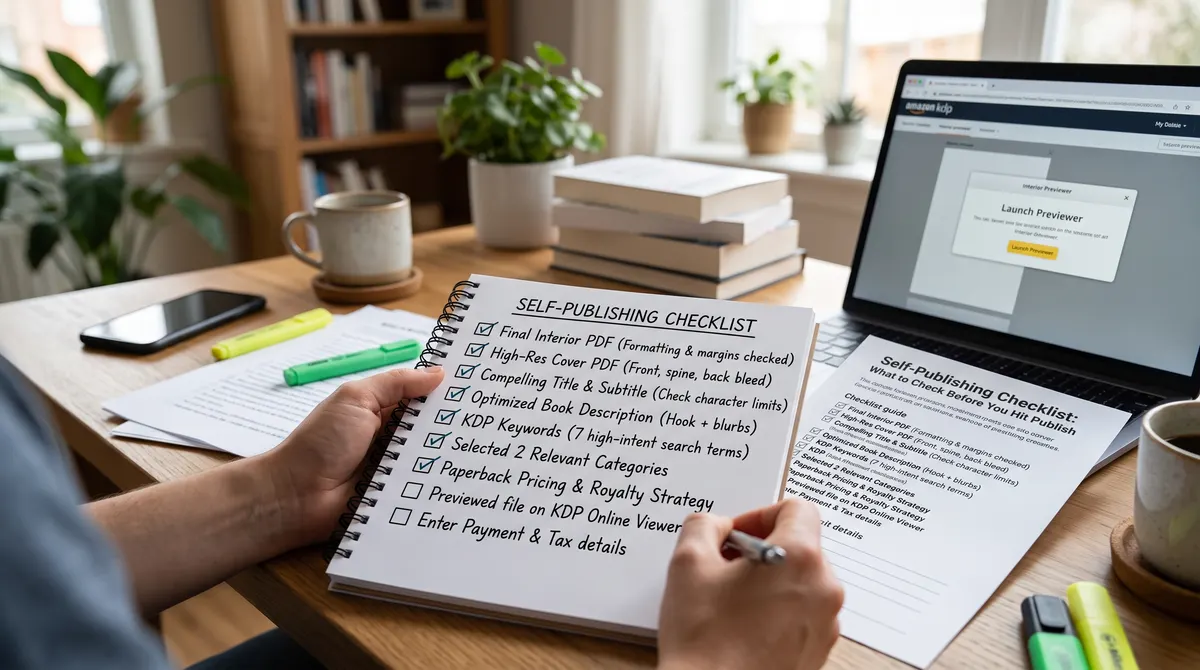
Check before you publish
Every platform has its own rules and they change. Use this list as a prompt, and confirm requirements on the platform's own pages.