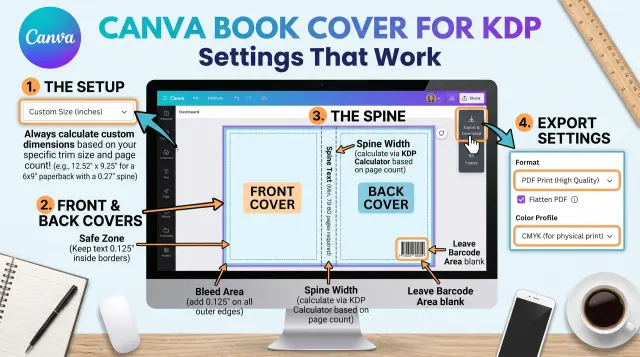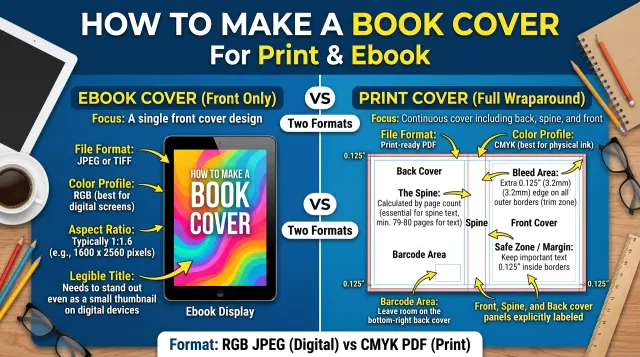
The spine formula
The spine width is your final page count multiplied by a thickness factor that depends on the paper. KDP lists these factors for paperbacks:
- White paper: page count x 0.002252 inches
- Cream paper: page count x 0.0025 inches
- Standard color: page count x 0.002252 inches
- Premium color: page count x 0.002347 inches
A 320-page novel on cream paper has a spine of 320 x 0.0025 = 0.8 inches. A 250-page nonfiction book on white paper has a spine of 250 x 0.002252 = 0.563 inches. Cream paper is thicker, so using the white factor for a cream book leaves the spine too narrow.
Working out the full cover size
KDP gives the width as: bleed + back cover width + spine width + front cover width + bleed. Bleed is 0.125 inches on each outside edge, and the cover is also 0.125 inches taller at the top and the bottom. For a 6 x 9 inch book with 200 pages on white paper:
- Spine: 200 x 0.002252 = 0.4504 inches
- Width: 0.125 + 6 + 0.4504 + 6 + 0.125 = 12.7004 inches
- Height: 9 + 0.125 + 0.125 = 9.25 inches
At 300 pixels per inch that is roughly 3811 x 2775 pixels. Our cover and spine calculator does this arithmetic for every standard KDP trim size.
Spine width for each paper type
Here is the same 400-page book on each paper type, using KDP's published factors:
| Paper | Factor per page | Spine for 400 pages |
|---|---|---|
| White | 0.002252 in | 0.9008 in |
| Cream | 0.0025 in | 1.0 in |
| Premium color | 0.002347 in | 0.9388 in |
The cream spine is about a tenth of an inch wider than the white one. On a book cover that is enough to push text off the spine.
A complete worked example
Take a 5.5 x 8.5 inch novel with 300 pages on cream paper:
- Spine: 300 x 0.0025 = 0.75 inches.
- Full width: 0.125 + 5.5 + 0.75 + 5.5 + 0.125 = 12.0 inches.
- Full height: 8.5 + 0.125 + 0.125 = 8.75 inches.
- At 300 pixels per inch the file is 3600 x 2625 pixels.
Give those numbers to your cover designer, with the paper type and the page count they are based on.
What goes where on the cover
The back cover is on the left, the spine in the middle and the front cover on the right. Keep important text and faces away from the edges and the fold lines. Because trimming moves by a small amount, text placed right at the edge of the spine can wrap onto a neighbouring panel.
A checklist for your cover designer
- Trim size, page count and paper type, written in one message.
- The spine width and full cover size in inches and pixels.
- Bleed of 0.125 inches on every outside edge.
- Whether the book has enough pages for spine text (80 or more for Cover Creator).
- A note that the spine will change if the page count changes.
Common mistakes
- Building the cover from the draft page count and then adding pages.
- Using the white paper factor for a cream interior.
- Forgetting the bleed, so the file is too small.
- Putting a barcode area or key text across a fold.
KDP also offers a cover template generator. Use it as a cross-check against our numbers.
When can you put text on the spine?
KDP's Cover Creator requires at least 80 pages before it allows spine text. Below that the spine is too thin to print legibly, so keep it blank or use a plain color band. Even above 80 pages, keep spine text inside the spine with a comfortable gap on each side, because the fold position varies slightly in manufacturing.
Always change the page count last
Every added or removed page changes the spine. Finish your interior file first, confirm the final page count in KDP's previewer, and only then build the cover. If you change the paper type from white to cream later, recalculate. KDP also offers its own cover template generator, which is worth using as a final check against any calculator, including ours.