Why have a website
Key takeaway: A website gives readers a home base. Stores and social platforms change. Your domain stays yours.
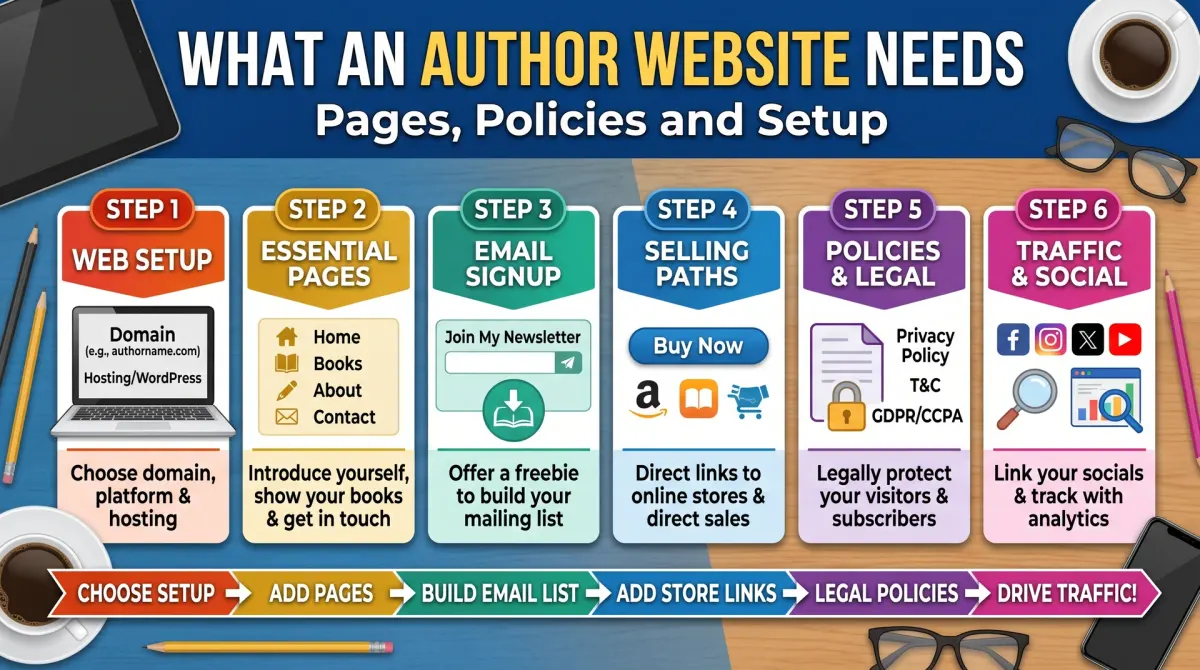
An author website is your own online home where readers learn about you and your books and can join your email list. It needs a clear home page, a books page, an about page, a way to contact you and basic policies, and it should load fast on a phone.
When a reader hears about your book, they often search your name. If nothing good appears, they may lose interest. A simple website gives them a place to learn about you, see your books and join your list.
A site also helps with trust. Reviewers, librarians and event organisers often check an author's site before they decide.
The five pages every author needs
Key takeaway: Five pages cover almost everything a reader or reviewer wants to know.
| Page | What it contains |
|---|---|
| Home | Your best book, a one-line promise and an email sign-up |
| About | A short bio, a photo and why you write |
| Books | Cover, description, buy links and sample for each book |
| Newsletter | A sign-up form and what subscribers get |
| Contact | A form or email address, and press or event details |
Keep the menu short. Put the most important action, usually the email sign-up or the buy link, where visitors see it without scrolling.
The home page
Key takeaway: The home page should say who the site is for and what to do next, within a few seconds.
Open with a clear line about your books and your reader. Show the cover of your newest book, with a button to buy. Add a short sign-up form with a clear reason to join, such as a free guide.
Avoid long introductions, music that plays on its own and large images that slow the page. Visitors are looking for one thing, so make it easy to find.
Books pages that sell
Key takeaway: Each book needs its own page with the same information a store would show, plus links to every store.
Add the cover, a short description, a sample chapter or a few lines, and buy links. Link to every store that sells the book, not only one. List formats and, for series, the reading order.
Add reviews only if they are real and you have permission to quote them. Use the exact words and name the source.
Email sign-up
Key takeaway: Put a sign-up form on every important page, and tell people what they get.
Use an email service that handles unsubscribes and storage. Offer a small gift, and say how often you will write. Collect only the data you need, usually a name and an email address.
Send a welcome email that delivers the gift and sets the tone. Then write regularly, even if only monthly.
Policies and legal basics
Key takeaway: If you collect emails or use analytics, publish a privacy policy. Rules vary by country, so check yours.
A privacy policy explains what data you collect, why, how long you keep it and how people can ask for removal. If you use cookies or tracking tools, many countries require a notice and a way to consent. If you use affiliate links, say so clearly near the links.
Add a short copyright line in the footer. This page is not legal advice, so check the rules where you and your readers live.
Speed, phones and search
Key takeaway: Most visitors will use a phone. A fast, simple site works better than a fancy one.
Compress images, use a small number of fonts and avoid heavy plugins. Test the site on a phone. Give every page a clear title and a short description, so search engines show it well. Use your name and book titles in headings.
Check that your site loads in a few seconds and that buttons are easy to tap.
What to skip at first
Key takeaway: You do not need a shop, a forum or a blog on day one.
Start with five pages. Add a blog only if you will update it. Add a shop only if you plan to sell direct. Add extra pages when readers ask for them.
Keep the site useful after launch
Key takeaway: A small site you keep current beats a big site you forget.
Set a reminder to update the site each time you release a book or change a price. Check the buy links every few months, since store links can break. Update your bio and photo when they change.
Look at your site statistics, if you use them, once a month. See which pages people visit and where they leave. If the books page is popular, make sure the buy buttons are easy to find. If few people sign up for your list, change the offer or move the form higher.
Make the site easy to use
Key takeaway: Readers should find what they need in two clicks.
Use plain menu labels such as Books, About and Contact. Make buttons large enough to tap on a phone. Use readable text with good contrast. Add descriptions to images for people who use screen readers. These small choices help every visitor.
Back up the site regularly, and keep your login details safe. Use two-step sign-in where it is offered.
Choose a name and a home for the site
Your domain name should be easy to say, spell and remember. Your own name is often the best choice. If it is taken, add a word such as "books" or "author".
Choose a host or a site builder you can manage. Look for easy updates, free security certificates and good support. Avoid anything that makes it hard to move your site later.
Register the domain in your own name and keep the login safe. Turn on auto-renew, or set a calendar reminder. Losing a domain is a painful and avoidable mistake.
Write for a reader who is in a hurry
Most visitors scan. Use short headings, short paragraphs and clear buttons. Put the main message at the top of the home page: who you write for, what you offer and what to do next.
Show your best book first, with the cover, a one-line hook and a link to buy. Add a sign-up box with a clear promise. Say what subscribers get and how often you will write.
Check every page on a phone. Many readers will see it there first.
Policies that build trust
If you collect emails, track visitors or use affiliate links, you need to say so. A privacy policy explains what data you collect and why. An affiliate disclosure explains that you may earn from links. Contact details show that a real person runs the site.
Rules differ by country, so read the official guidance where you live. If you are unsure, ask a professional. Do not copy another site's policy word for word.
Place the links in the footer so they are on every page.
Speed and search basics
A fast site keeps visitors. Use compressed images, a lean theme and few add-ons. Add a clear title and description to each page. Give images useful alt text. Use real headings.
Connect your site to a search console tool to see which pages appear in search. Check broken links every few months.
You do not need advanced tricks. Clear writing, a tidy structure and a fast page cover most of what matters.
The five pages in more detail
Home. A clear promise, your best book, an email sign-up and a menu. Books. One block per book with the cover, a short hook, formats and buy links. About. A short story of who you are, why you write and what readers can expect. Contact. A form or an email address, and a line on how fast you reply. Privacy. What you collect and how you use it.
Add a page per book when you have time. Each page can carry a longer description, sample pages, reviews and links to every store. Link to your newsletter on every page.
Keep the structure flat. Visitors should reach any page in one or two clicks.
Email sign-up that readers want to use
An email list is the most direct way to reach readers. Offer something small and useful, such as a short story, a checklist or a sample chapter. Say what they will get and how often.
Use a double opt-in if your tool offers it, and keep a simple record of consent. Add an unsubscribe link in every email. Send a welcome message at once with the promised gift.
Do not buy lists. Grow slowly from people who asked to hear from you. A small list of interested readers beats a large list of strangers.
What to skip at the start
You do not need a store, a forum, a podcast page or a complex design on day one. Each feature adds work and slows the site. Start small, publish, and add features only when readers ask for them.
Avoid autoplay media, pop-ups that cover the page and large background videos. They slow the site and annoy visitors, and search tools treat poor page experience as a negative signal.
Spend your time on the writing of the pages, a clean photo and clear buttons. Those choices matter far more than clever effects.
People also ask about author websites
Do authors need a website?
It is not required, but it helps. A website is the one place you control. You can collect emails, show all your books and link to any store. Social accounts and stores can change their rules. A simple site gives you a stable base for your author brand.
What pages should an author website have?
A home page, a books page, an about page, a contact page and a privacy policy cover the basics. Add a page for each book once you have several. If you collect emails, explain how you use them. Keep the menu short so visitors find things fast.
How much does an author website cost?
Costs vary. You pay for a domain name and for hosting or a site builder, and some themes and tools cost extra. Many authors start with a simple setup and add features later. Check each provider's current prices, and renewal costs, before you commit.
Keep it alive
Update the site when you release a book, change your bio or retire a link. Set a monthly reminder. A site with old news looks abandoned.
Sources
- KDP: Help hub
- Google Search Central: SEO starter guide