Start with the numbers
Key takeaway: Fix the trim size and page count before you design anything. A cover made for the wrong size must be redone.
To make a book cover, you first get the exact size from your trim size and page count, then design the front, spine and back inside bleed and safe zones, and finally export a print-ready file. You can use a template tool, a designer or your own software.
Many cover problems start because the designer did not know the page count. The spine width comes from the page count, so a late change in pages can break the whole cover.
Decide these items first:
- Trim size, for example 6 x 9 inches.
- Interior colour, black and white or colour.
- Paper type, such as white or cream.
- Final page count after formatting.
- Format: paperback, hardcover or ebook.
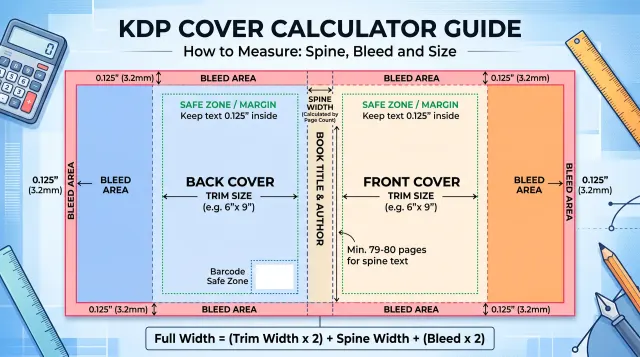
Once the interior is final, calculate the cover size. The KDP cover calculator and template tool do this for you.
Choose how to make the cover
Key takeaway: There are four routes. The right one depends on your budget, skill and genre.
| Route | Cost | Control | Risk |
|---|---|---|---|
| Hire a cover designer | Highest | Shared | Check portfolio and files |
| Use a template tool | Low | Medium | Many books look alike |
| Use KDP Cover Creator | Free | Low | Limited designs |
| Design it yourself | Time | Full | Skill gap shows |
If you hire a designer, ask for the print-ready PDF, the ebook image and the source files. Agree who owns the artwork and fonts in writing.
If you use a tool, read its licence for images and fonts. Some licences limit use on covers sold for profit.
Learn your genre
Key takeaway: Readers use the cover to guess the genre. A cover that signals the wrong genre attracts the wrong readers.
Look at the top ten books in your category. Note the colours, fonts and layout. You will see patterns. Thrillers often use bold type and dark colours. Romance often uses warm colours and illustrations. Business books often use simple type on a clean background.
You do not need to copy any single cover. You do need to look like you belong on the same shelf. A cover that is too different confuses readers, and one that is too close to another book can cause trouble.
Write down three words your cover should say, such as "calm", "practical" and "trusted". Use them to guide every design choice.
Design the front cover
Key takeaway: The front cover has three jobs: show the title, show the genre and look good as a thumbnail.
Keep the design simple. One strong image or shape, a clear title and the author name are enough. Use a font that stays readable at small size. Avoid thin scripts for the title, because they vanish in thumbnails.
Test the cover at the size of a small thumbnail, about 150 pixels tall. If you cannot read the title, make it larger or increase the contrast. View it in greyscale too, to check contrast.
Design the spine and back
Key takeaway: The spine and back need as much care as the front. Readers often turn a book over.
The back cover usually holds a short hook, a few lines of description, a review or endorsement if you have a real one, the author line and a barcode area. Leave the barcode space free, since the ISBN barcode is added there.
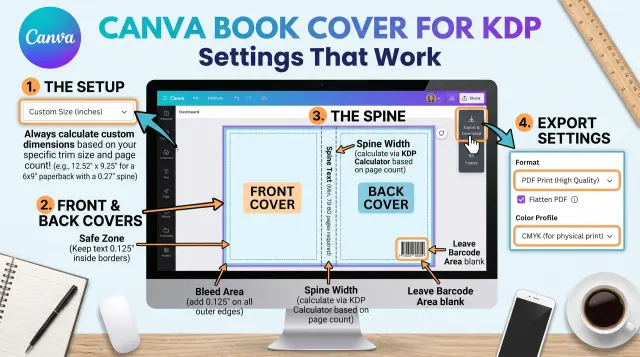
The spine usually holds the title, the author name and a small logo. KDP allows spine text only when the book has enough pages, so check the template notes for the minimum. Keep text away from the spine edges, because small shifts in printing can move it.
Set bleed and safe zones
Key takeaway: Extend backgrounds into the bleed. Keep text inside the safe zone.
Bleed is extra image area beyond the trim edge that gets cut off. It prevents thin white lines when the pages are trimmed. The safe zone is the area inside the trim where text is safe from being cut.
KDP paperback covers use a bleed of 0.125 inch on the outside edges. Always use the numbers on the KDP template for your own book, because they depend on your trim and page count.
Export and check
Key takeaway: Export a print-ready PDF and check it against the KDP template before you upload.
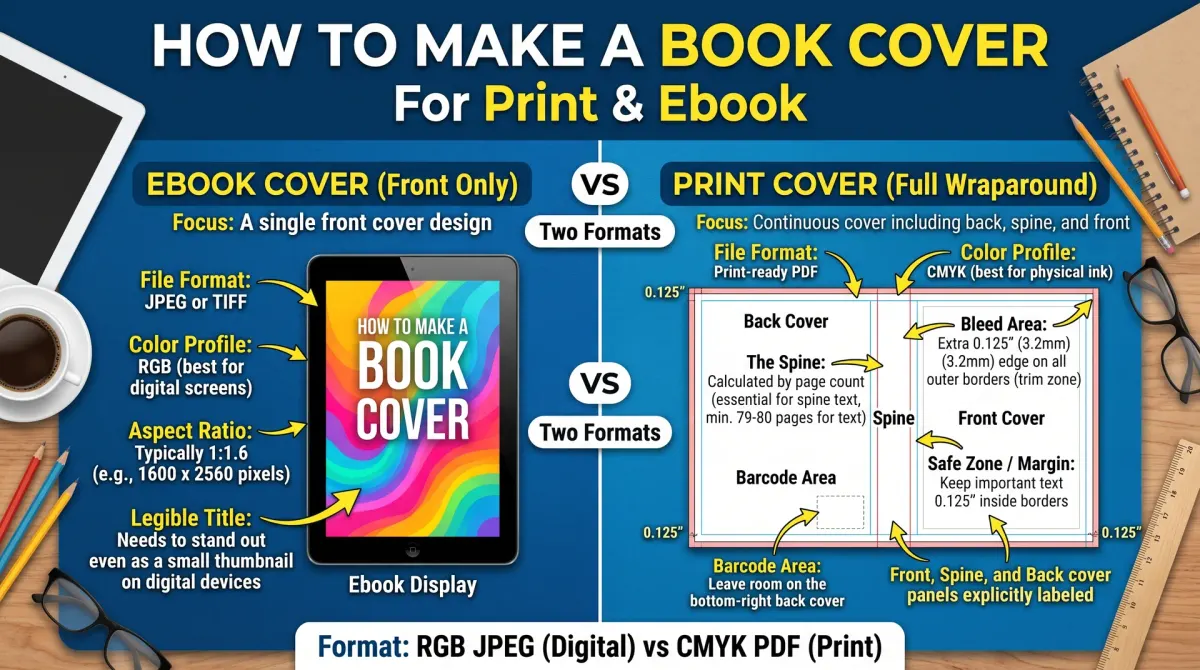
Export the cover as a single PDF at the full size. Use high resolution images, with 300 pixels per inch as the usual target. Check the PDF in a viewer. Make sure fonts are embedded and the page size matches the template.
For ebooks, export the front cover as an image file. KDP lists the recommended image dimensions on its help pages, and the ideal shape is tall with a height-to-width ratio of 1.6 to 1.
Look at your genre before you design
Readers use covers to recognise genre. A thriller, a romance and a business book look different. Study the top books in your category. Note colours, type styles and image types.
Do not copy a cover. Learn the signals and use them in your own way. Your cover should say what kind of book it is within a second.
Save six examples that you like in a folder. Write one line on why each works.
Pick type that can be read
Type does most of the work on a cover. Choose a title font that is clear at small size. Keep the title short on the cover, even if the full title is longer. Put the subtitle in smaller type.
Limit yourself to two fonts. Check licences if you use paid fonts. Keep strong contrast between text and background.
Test by shrinking the cover to thumbnail size. If you cannot read the title, increase the size or the contrast.
Choose images you can legally use
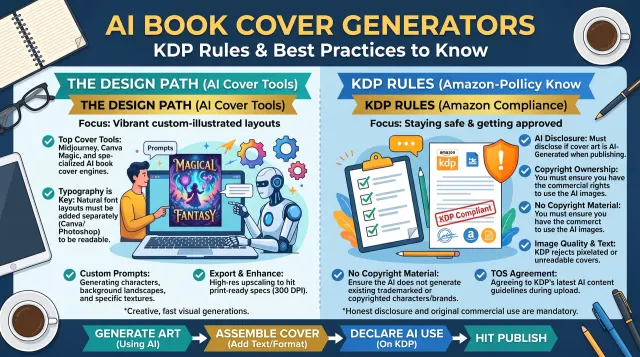
Use your own photos, commissioned art or images with a clear commercial licence. Keep proof of the licence. Do not take images from a web search.
Check the rules on people, logos and brands in your images. A recognisable person or brand can cause legal trouble.
If you use stock images, check that the licence allows use on products for sale and note any limits on print runs.
Build the back cover
The back cover sells the book once the front has caught attention. Add a short hook, a few lines of description, an endorsement if you have one and an author line.
Leave room for the barcode. KDP can place one in a set area, so keep that space clear.
Use the same fonts and colours as the front. Keep the text inside the safe zone.
Set the spine correctly
The spine width depends on the page count and paper type. Use the calculator after your interior is final. Add the title and author name on the spine only if the book is thick enough, as the platform rules advise.
Check that the text on the spine is centred. Small shifts can be seen when the book is printed.
Export, check and order a proof
Export a print PDF at the exact size. Upload it to the KDP previewer. Look at the trim lines and the barcode area. Fix any warnings.
Order a proof. Check colours, spine alignment and edges. Print colours can differ from screens.
Save your project files, your font list and your licence proof. You will need them for updates.
Ebook and print covers together
The ebook cover is the front of the print cover, resized. Export it as an image at the size the store recommends. Check it at small size.
Keep the design consistent across formats. A matching set builds trust.
Test your cover with readers
Before you finish, test the cover. Show three options to a small group of readers. Ask which book they would pick up and why. Ask what they think the book is about.
Place your cover beside the top books in your category at thumbnail size. Does it fit? Does it stand out in a good way?
Use the feedback to fix type size, colour or image choice. A small change can make a big difference.
Common cover mistakes
Typical mistakes are too many fonts, low contrast, small titles, cluttered images, wrong size and copied styles that look cheap. Another is to design only the front and forget the spine and back.
A further mistake is to use images without a clear licence. Check every asset.
Finally, do not skip the proof. Printed colours and edges may surprise you.
Keep a cover brief
Write a one-page brief with the genre, the reader, the title, the subtitle, the mood, example covers, colours to use and avoid, and the sizes. Share it with a designer or use it yourself.
This brief also helps when you make a series, because covers can then match.
Working with a designer
If you hire a designer, give a clear brief and agree the terms in writing. List the files you expect: a print PDF, an ebook image and the source file. Agree the number of revisions, the price and the date.
Ask about licences for images and fonts. Make sure you may use them on the cover for sale.
Give feedback in plain terms, such as "the title is hard to read at small size". Avoid vague notes. Clear feedback leads to a better cover and a calmer project.
People also ask about making a book cover
Can I make my own book cover?
Yes. Many authors use template tools or design software. Get exact sizes from the KDP cover calculator, follow the bleed and safe zone rules and test the file in the previewer. If design is not your skill, a freelance designer can finish the work and deliver a print-ready file.
What size should a book cover be?
It depends on the trim size, page count and paper type. A print cover is one wide file with back, spine and front plus bleed. Use the KDP cover calculator to get the exact width and height. Ebook covers are a single front image with set minimum sizes.
How much should a book cover cost?
Costs range from a free template to a custom design by a professional. Compare portfolios and quotes. Ask what files and rights are included. Spend according to your genre and goals, because covers matter more in crowded genres.
Know when to hire help
Hire a designer if you struggle with the layout, if your genre is competitive or if you plan a series. Ask for a print-ready file, the source file and the licence list.