What AI can and cannot do for a cover
Key takeaway: AI can create background art and ideas fast. It cannot replace layout, typography or the size checks a print cover needs.
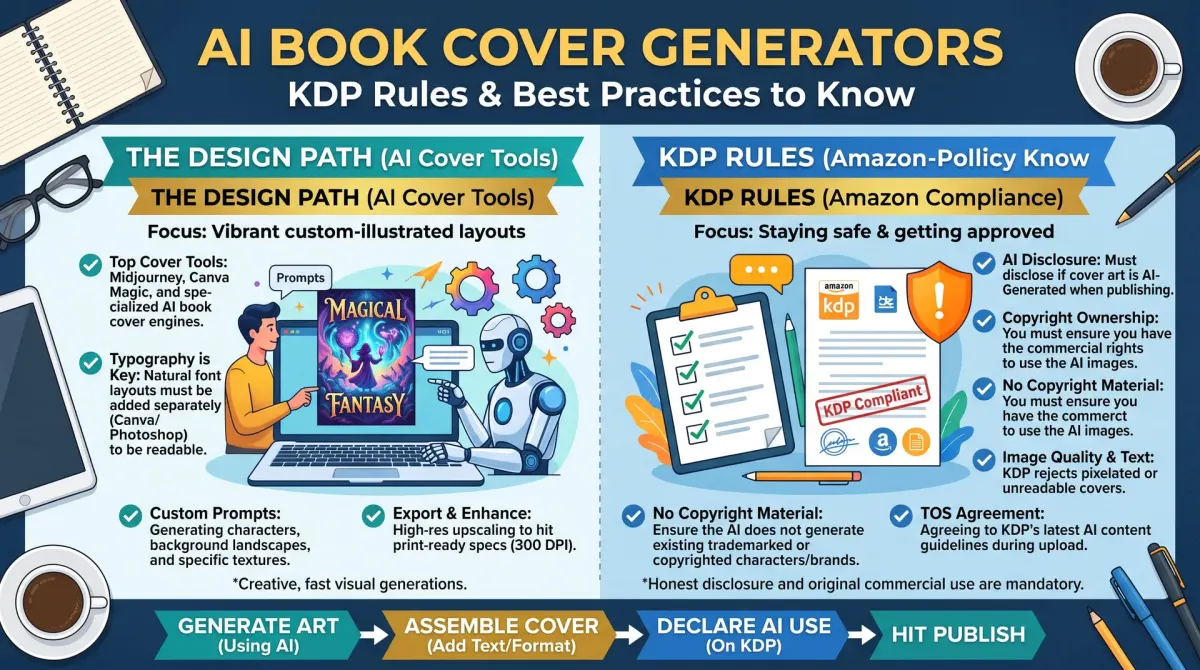
An AI book cover generator is a tool that creates cover art from a text prompt. Authors can use the art as part of a cover, but they must follow KDP's rules on disclosing AI-generated content, check the tool's licence and still build a correctly sized print file.
AI image tools can produce backgrounds, illustrations and mood ideas in minutes. This can help authors who do not draw. Some tools also suggest layouts.
AI has limits. It often makes mistakes in lettering, so the title text is usually better added in a design tool. It can produce odd hands, faces or objects. It does not know your trim size or spine width. A human still has to build the final print file.
The KDP rules
Key takeaway: Disclose AI-generated images and own the rights to what you upload. KDP can remove books that break its content rules.
KDP requires you to tell it when your content is AI-generated, which includes images and covers. It separates AI-generated content from AI-assisted content that you edit heavily. When you publish, you answer a question about this. Read the current KDP content guidelines for the exact wording, because rules can change.
KDP's general rules also apply. Do not upload content that you do not have the rights to use. Do not copy another cover. Do not mislead readers with a cover that does not match the book.
Rights and licence checks
Key takeaway: Read the terms of the AI tool. They say what you may do with the images.
Before you use an AI image on a cover, check these points.
- Does the tool allow commercial use?
- Does the licence need a paid plan for commercial use?
- Does the tool claim any rights over the output?
- Are there limits on using the image as the main part of a product?
- Does the output look like a known character, brand or artwork?
Keep a record of your prompts, the date and the plan you used. If a question ever arises, these records help.
In the US, the Copyright Office has said that material made by AI without human creative input is generally not protected by copyright. This can affect how well you can stop others from copying a cover. Read the Office's current guidance.
A safe workflow
Key takeaway: Use AI for the art, then do the layout and checks yourself.
- Write your size numbers first, using the cover calculator.
- Generate several background images that fit your genre.
- Pick one and check it for odd details, such as strange hands or text.
- Upscale or regenerate the image so it is large enough for 300 pixels per inch.
- Build the cover in a design tool, and add the title and author name there.
- Add bleed, the spine and the back cover.
- Export a print PDF and check it against the KDP template.
- Order a printed proof.
Quality problems to look for
Key takeaway: Zoom in and look at every part of the image before you commit.
| Problem | What it looks like | What to do |
|---|---|---|
| Garbled text | Letters that are not real words | Remove it and add real text |
| Extra or missing fingers | Odd hands | Change the image or crop |
| Warped objects | Bent or melted shapes | Regenerate |
| Look-alike of a real cover | Too close to a known book | Change the concept |
| Low resolution | Blur in print | Upscale or regenerate larger |
| Stock look | Many books look alike | Add your own type and layout |
Pros and cons
Key takeaway: AI is quick and cheap. It is also less predictable than a professional designer.
AI saves time and money, and it lets you try many ideas. A human designer understands genre, typography and print rules. Some authors use AI to create a concept, then hire a designer to build the final cover. This can reduce cost and risk.
Whichever route you choose, readers care about whether the cover fits the book. A cover that looks cheap or confusing loses clicks.
What readers expect
Key takeaway: Readers care about the result, not the tool. Still, honesty and quality matter.
Readers judge a cover by whether it fits the genre and looks well made. Many do not know or care how the art was made. Some groups of readers and authors do care, and may react badly if a cover looks generic or has obvious AI errors.
Be honest in the places where you must be, such as KDP's disclosure question. Do not claim a cover is hand-painted if it is not. Focus on the parts you control: layout, type, colour and fit with the genre.
Build a stronger cover on top of AI art
Key takeaway: The art is only one layer. Typography and layout make a cover look professional.
Use a strong title font, and keep the hierarchy clear: title first, then subtitle, then author name. Place text where the image is calm, not where it is busy. Add a subtle shadow or overlay if the text is hard to read. Keep the margins even.
Look at the top ten covers in your category. Compare your type size and spacing against theirs. Small changes often make the biggest difference.
Read the tool's licence first
Every AI tool has its own terms. Some allow commercial use on all plans. Some limit it to paid plans. Some ask you to credit the tool. A few reserve rights you may not expect.
Before you pay for a cover job, read the terms for your plan. Save a copy of the page, with the date, in your book folder. If the rules change later, you can show what applied when you made the cover.
Also check what the tool says about prompts. If you ask for the style of a living artist or for a known character, you risk a rights problem. Describe the mood, colours and objects instead.
Why a raw AI image is rarely a finished cover
An AI image is only a picture. A cover is a designed product. It needs a title that can be read at thumbnail size, an author name, a clear focal point and room for a spine and a back cover.
AI tools often draw odd hands, warped text and extra objects. They may add fake lettering that looks like a real word. Inspect the image at full size and fix or remove every flaw.
If you do not have design skills, hire a designer to turn your art into a print file. Or use a template tool, and place your own text over the art. Either path beats uploading the raw image.
Keeping records for rights and disclosure
Make a short record for each cover. Note the tool, the date, the plan, the prompts you used and any edits you made by hand. Keep the original file and the final file.
This record helps in three ways. It supports your KDP disclosure answer. It shows your human contribution if you ever register a copyright. It helps a new designer continue the work if you hire one later.
Store the record with the book's other files, and back it up.
Reader trust and your cover
Readers judge a book by its cover within seconds. Many are tired of generic AI art, so a cover that looks like everyone else's can hurt. Look at the top books in your genre and notice what they do with type, colour and layout. Then make choices that fit the genre and still look like your book.
Test your cover with a few readers. Show it at small size and ask what kind of book it is. If they guess wrongly, adjust it.
Hiring a designer to finish AI art
If you like an AI image but cannot finish the cover yourself, a designer can help. Send the image, the licence notes, your trim size and your page count. Tell them the genre and who the book is for.
Ask the designer how they handle AI material. Some work with it, some do not. Ask them to put the text and layout on top of your art, build the spine and back and return a print-ready PDF. Get the price, the revision rounds and the delivery date in writing.
A good designer will also point out problems you missed, such as muddy colours at small size or a title that is hard to read. That feedback is often worth more than the file itself.
Test the cover before you publish
A cover has to work in two places. At full size it must look professional on a print book. At thumbnail size it must stay readable on a phone screen.
Shrink the cover to the size of a small store thumbnail. Can you read the title? Does the image still read as the right genre? Put it beside the top covers in your category. Does it look like it belongs, while still standing out a little?
Show it to a few readers and ask what they think the book is about. If their answers do not match your book, adjust the image or the type. Then run the KDP previewer and order a proof to check the printed colours.
People also ask about AI book covers
Does KDP allow AI-generated book covers?
KDP allows books that use AI-generated images, but it asks you to disclose AI-generated content when you publish. It also has content rules that still apply. Read the current KDP content guidelines and answer the disclosure question honestly. Rules can change, so check the help pages each time.
Can I copyright an AI-generated cover?
Copyright usually needs human authorship. In the US, the Copyright Office says material made by AI with no human creative input is generally not protected. Your own text, layout and added design work may be. Rules differ by country, so read the official guidance and keep notes of your own contribution.
What size should an AI cover be for KDP?
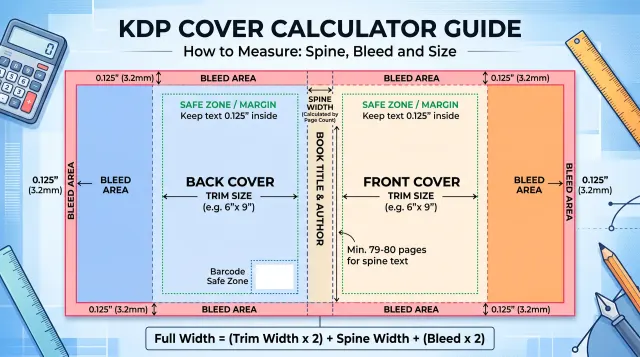
The size depends on your trim size and page count. Use the KDP cover calculator to get the exact width and height with bleed. Many AI tools make small or odd-shaped images, so you may need to extend or rebuild the art. Check the result in the KDP previewer.
A careful way forward
AI can help you explore ideas fast. It cannot replace a clear plan, a proper file or an honest disclosure. Use it for sketches and raw art, follow the KDP rules and finish the cover with real design work.
If the rules change, update your records and your files. A careful approach protects both your book and your account.