What goes on the back cover of a book?
Key takeaway: Include a blurb, a tagline and proof. Keep the barcode area clear.
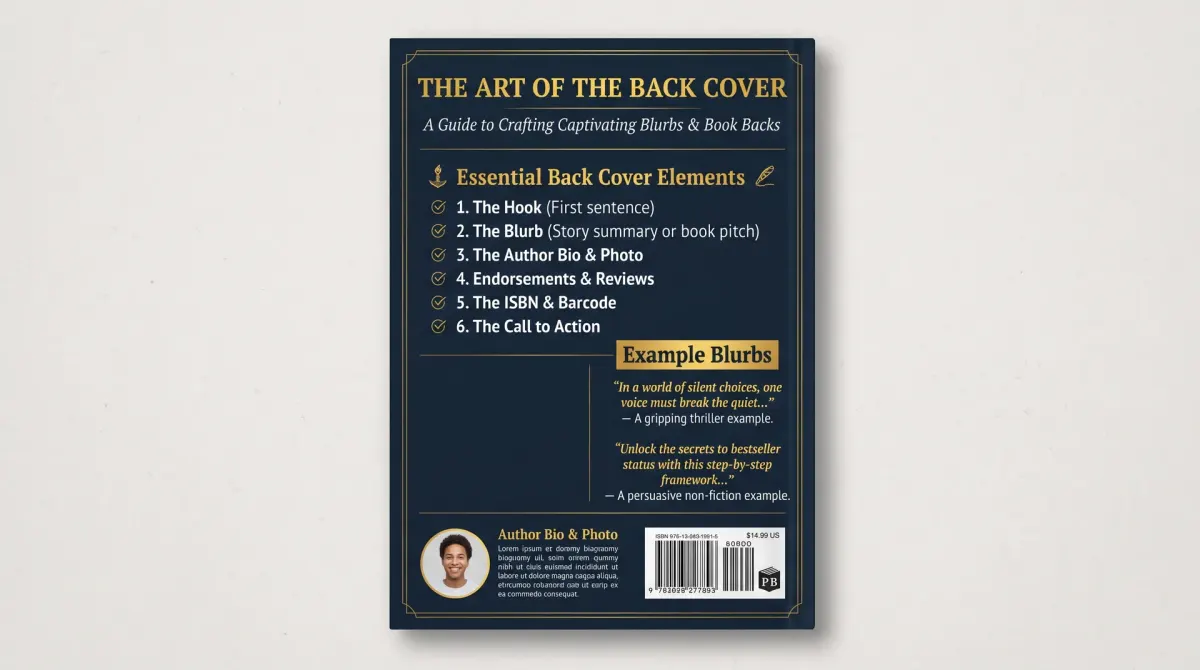
The back cover of a book is the rear panel that sells the book to a browsing reader. It usually holds a blurb, a tagline, praise quotes, a short author line and a barcode area. Its job is to give a quick reason to buy.
Here are the parts, in the order readers see them.
- Tagline. One line that sets the hook.
- Blurb. A short summary of the story or the promise.
- Praise or review quotes. One or two lines of social proof.
- Author line. One sentence about the writer.
- Barcode area. A clear zone for the barcode.
- Publisher mark or website. Optional.
You do not need every part. A debut author with no reviews can skip the praise. A short book may skip the author line.
What you must not do is fill the whole panel. White space makes the text easier to read. Crowded covers look cheap.
Good back covers also match the front. Use the same fonts and colors. The two sides should feel like one design.
What is a book blurb?
Key takeaway: A blurb is a short promotional summary. It sells the book without telling the whole story.
A book blurb is a short promotional text on the back cover or the sales page. It introduces the main character or promise and shows what is at stake. Then it ends with a hook. Most run from 100 to 150 words.
You will also see the term back cover blurb. It is the same text, printed on the physical book.
A blurb is not a synopsis. A synopsis tells the full plot, including the ending. A blurb stops before the ending. It teases and does not spoil.
A blurb is also different from praise. Praise is a quote from a reviewer or another author. Some people call that quote a "blurb" too. In this guide, a blurb means your own summary.
For fiction, a blurb follows a simple shape: a character, a problem, rising stakes and a question. For nonfiction, it follows a different shape: a reader, a pain, a promise and a proof.
Keep sentences short. A blurb is read fast.
How to write a back cover blurb: steps
Key takeaway: Write the hook first. Then add the setup, the stakes and the call to action.
Follow this method for any genre.
- Write a one-line hook.
- Name the main character or reader.
- State the problem.
- Show the stakes.
- End with a question or promise.
- Trim to 150 words or fewer.
- Read it aloud.
Here is a word budget with shown math for a 125-word fiction blurb.
- Hook: 20 words.
- Setup: 50 words.
- Stakes: 40 words.
- Closing line: 15 words.
- Total: 20 + 50 + 40 + 15 = 125 words.
That fits comfortably on most back covers. Take a 6×9 inch book. Leave 0.125 inches on each side. The usable width is 6 − 0.125 − 0.125 = 5.75 inches. Keep the blurb inside that width.
Use short paragraphs of two or three lines. Avoid walls of text.
Book blurb examples
Key takeaway: Model the shape, not the words. Swap in your own character, problem and stakes.
Use these book blurb examples as templates. They are invented.
Fiction blurb example (about 90 words):
Maya Torres has one week to find the missing ledger. The fate of her family's bakery depends on it.
When a stranger leaves a cake box with a coded note, Maya follows the clues across Harbor Lane. Each step brings her closer to a secret her town has kept for forty years.
But someone else wants the ledger too. And they will not stop at a few broken windows.
Can Maya solve the puzzle before the bakery, and everything she loves, is lost?
Nonfiction blurb example (about 80 words):
Most small business owners guess their first-year sales. Then they run out of cash.
The First-Year Plan gives you a simple method to forecast sales, set prices and track cash from day one. You will learn how to build a one-page plan, avoid the three common pricing mistakes and know when to hire.
Written by a former bakery owner, this guide is short, clear and practical.
Start your first year with a plan.
Notice what they share. Each opens with a hook. Each names who the book is for. Each ends with a clear next thought.
Look at five books in your genre. Count the words in their blurbs. Match the length and the tone.
Using a book description generator
Key takeaway: A generator gives you a draft. You must check every line and rewrite it in your voice.
A book description generator is a tool that drafts blurbs from a few inputs, such as genre, character and conflict. Some are free. Some are part of a larger writing tool.
These tools help when you are stuck. They give you a structure fast. They can also show different angles on the same story.
They have limits. A generator does not know your book. It may invent plot points, repeat clichés or reveal spoilers. It may also write in a flat style.
Use a generator like this:
- Give it your hook, character and stakes.
- Ask for three versions.
- Pick the best lines from each.
- Rewrite them in your own voice.
- Check every fact against your book.
Never publish a draft without a full read. You are responsible for every word.
The site's own builder can help you format the text for retail pages.
Back cover of a book: layout and KDP rules
Key takeaway: Keep text inside the safe zone. Keep the barcode area clear. Use fonts of at least 7 points.
Amazon KDP is Amazon's self-publishing service for ebooks and paperbacks. Its cover help page and barcode help page set clear layout rules.
- Bleed. Extend the background 0.125 inches beyond the trim edge.
- Safe margin. Keep text at least 0.125 inches inside the trim edge.
- Font size. Use at least 7 points. Aim higher for the blurb so readers can read it with ease.
- Barcode. KDP adds a barcode if you do not provide one. Text or images in the barcode area will be rejected.
- Your own barcode. KDP suggests 2 inches by 1.2 inches, with a minimum of 1.4 by 0.8 inches. Keep it 0.25 inches from the spine and trim edge, in black on white.
Plan the blurb around the barcode. Many authors place the barcode at the lower right and the blurb above it.
Match the cover text to the book. KDP says the title, author name, edition and ISBN on the cover must match the details in your book setup.
Back cover vs online book description
Key takeaway: The two texts are related but not identical. Online rules are stricter.
The back cover blurb and the online description do similar jobs. But the Amazon description has its own rules.
KDP's description page suggests a paragraph of about 150 words. The limit is 4,000 characters, and HTML tags count toward it. The description may not include URLs or contact information, reviews or quotes, price details, spoilers or emojis.
Those rules apply to the online description. The printed back cover is a different space. You can include praise quotes there if you have permission to use them.
Many authors write one blurb and adapt it. They keep the core hook and trim or expand it. On the cover, they add praise and the barcode. Online, they add formatting and remove restricted items.
Keep both versions in a file. Update both when the book changes.
People Also Ask
How long should a back cover blurb be?
Most run from 100 to 150 words. KDP suggests a description of about 150 words for the online page. Shorter blurbs read faster and leave white space. Count your words and test the layout at your trim size. Leave white space around the text.
Do I need a barcode on the back cover?
No. KDP adds a barcode if you do not provide one. Leave the barcode area empty so nothing is rejected. If you add your own, follow KDP's size and placement rules. Keep the barcode area free of text and images. KDP may reject files that break this rule.
Should I put reviews on the back cover?
You can, if you have permission and the quotes are real. One or two short lines work best. They add proof. Do not invent quotes. For the online description, KDP does not allow reviews or quotes. Keep praise short and accurate.
Common mistakes
Key takeaway: Most weak back covers are crowded, vague or spoiler-heavy.
- Telling the whole plot.
- Writing a long block of text.
- Placing text in the barcode area.
- Using praise you cannot prove.
- Using a font that is too small to read.
Your next step: draft the hook
Write your one-line hook today. Then build the blurb with the word budget above. Check it against your trim size and layout.
When the text is ready, add it to your cover file and run the checklist.