What KDP Select is
Key takeaway: KDP Select trades exclusivity for extra Amazon tools. It is optional and can be turned off.
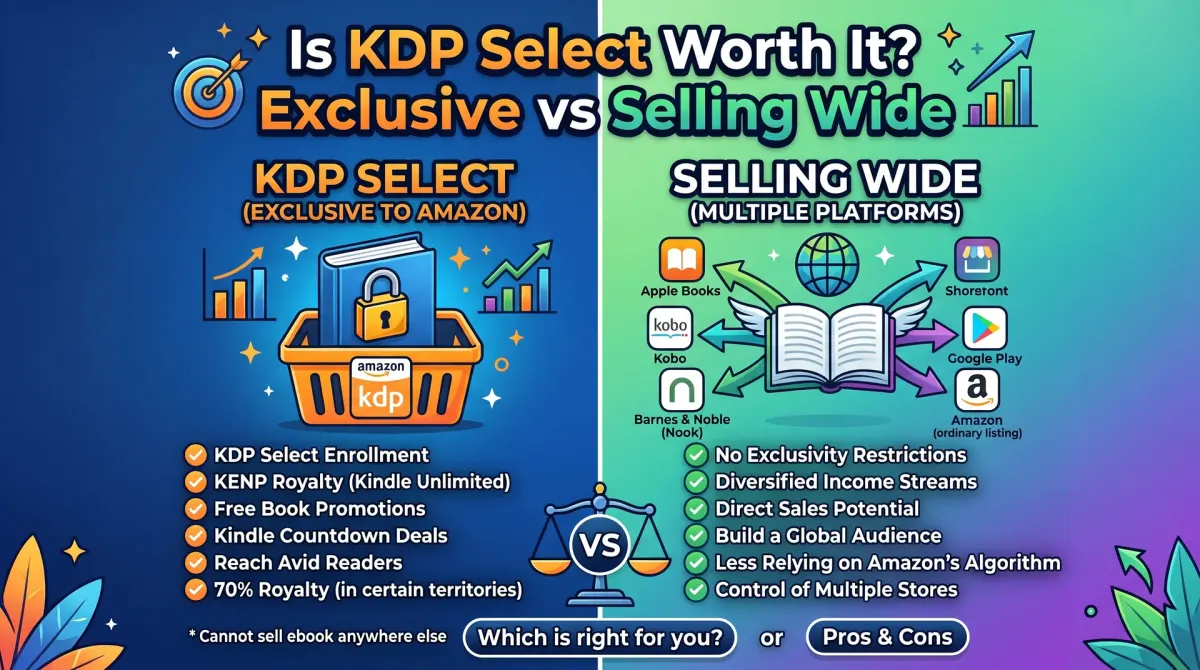
KDP Select is an optional programme for ebooks on Amazon KDP. You sell the ebook only on Amazon for a set term. In return, you can earn from Kindle Unlimited page reads and use promotion tools such as Countdown Deals.
KDP Select is a programme inside KDP. You enrol an ebook for 90 days. During that period, you agree to sell the digital edition only through Amazon. The programme can renew automatically unless you turn it off.
In exchange, you get access to promotion tools and your ebook becomes available to Kindle Unlimited subscribers. Print books are not affected, so you can still sell paperbacks and hardcovers anywhere.
How you earn in KDP Select
Key takeaway: In Kindle Unlimited you are paid per page read, not per sale. Both routes can work, but they pay differently.
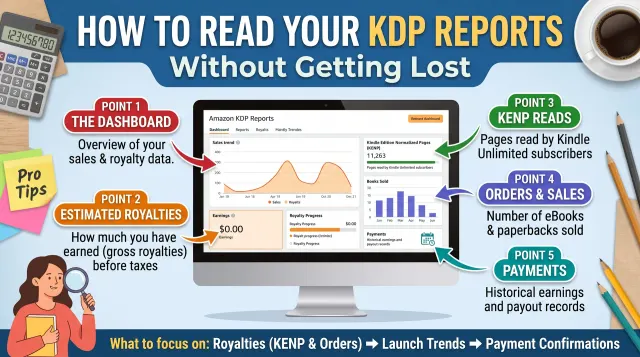
When a Kindle Unlimited reader borrows your book, you are paid based on the pages they read. KDP sets a global fund each month and divides it by total pages read. The rate per page changes from month to month, so you cannot know it in advance.
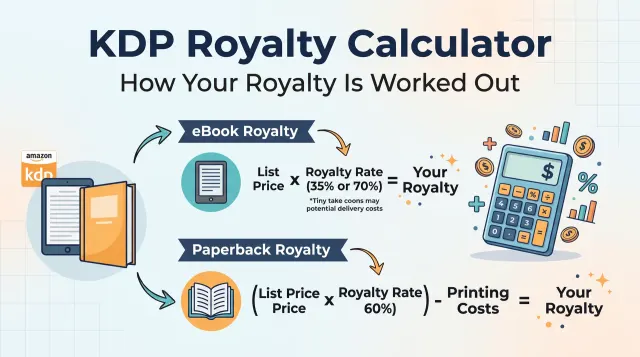
When someone buys your ebook, you earn the normal 35% or 70% royalty. Both kinds of income can appear in the same reports.
What you give up
Key takeaway: Exclusivity means no other digital store. Check the rules before you enrol, because a breach can remove your book.
During the 90 days, your ebook cannot be on other stores, on your own website as a paid download, or in other subscription services. Short samples are allowed within limits that KDP sets. Read the current terms for details.
You can still:
- sell the paperback and hardcover anywhere
- give away small excerpts, within KDP's limits
- publish a different book wide
You cannot sell the same ebook through Apple Books, Kobo, Google Play or your own shop while enrolled.
KDP Select or wide?
Key takeaway: Select suits Amazon-heavy readers and series. Wide suits readers who use many stores or libraries.
| Point | KDP Select | Selling wide |
|---|---|---|
| Where the ebook sells | Amazon only | Many stores |
| Income type | Sales + page reads | Sales only (plus library lending) |
| Promotion tools | Amazon's Select tools | Store-by-store promotions |
| Reader reach | Large Amazon base | Spread across platforms |
| Risk | All income from one store | More work to manage |
| Flexibility | 90-day commitments | Change any time |
A simple way to decide
Key takeaway: Test with real data. Use your own sales and page reads, not other authors' stories.
Here is a method.
- Look at where your readers come from. If most buyers come from Amazon, Select costs you little.
- Publish with Select for one or two 90-day periods and note your income from sales and page reads.
- Move wide for a similar period and note income from each store.
- Compare totals. Choose the option that earns more after your effort.
Genre matters. Some genres, such as long series in popular fiction, have many Kindle Unlimited readers. Others, such as non-fiction guides, may sell more as individual purchases.
Keep records. A simple table with dates, units sold, page reads and income lets you compare fairly.
Rules and risks
Key takeaway: Follow the programme rules exactly. Breaking them can lead to removal from Select or worse.
Do not try to hide a copy of the ebook on another store. KDP checks for it and can remove your ebook from the programme. Do not use clickbait titles, stuffed keywords or page-stuffing to inflate page reads. KDP actively detects abuse and can remove books and accounts.
If you plan to move wide, turn off auto-renewal at least a few days before the period ends and remove the ebook from other stores only after the period finishes.
A worked comparison
Key takeaway: Compare total income across equal periods. Use your own numbers.
Here is an example with made-up round numbers to show the method, not a forecast. Imagine two 90-day periods for the same ebook priced at $4.99.
| Item | Period A: Select | Period B: Wide |
|---|---|---|
| Ebook sales | 100 | 80 |
| Royalty per sale (70%, 2 MB) | $3.19 | $3.19 |
| Sales income | $319 | $255 |
| Pages read | 20,000 | 0 |
| Page-read income | Depends on the monthly rate | $0 |
| Other stores | Not allowed | Added income from each store |
Notice that the page-read income and other-store income are blanks you fill from your own reports. The row that matters is the last one: add every income line, then subtract the extra time you spent on each option. Only then compare.
Who tends to benefit
Key takeaway: Select suits some books better than others. Genre, series length and audience all matter.
Select can fit if you write a long series that readers binge, if most of your traffic already comes from Amazon, or if you want to launch a new book with Amazon's tools. Wide can fit if your readers use libraries and other stores, if you have your own audience and email list, or if you want to reduce your dependence on one company.
Whatever you pick, you can change it. The 90-day structure means no choice is permanent.
Understand the trade
KDP Select gives access to Kindle Unlimited readers and promotion tools. The cost is exclusivity for the ebook. You cannot sell it in other stores while enrolled.
The choice is not about right or wrong. It is a trade of reach for access. Which one pays better depends on your book, your readers and your genre.
Write down what you expect to gain and what you may lose.
Think about your readers
Some genres have many readers who use Kindle Unlimited. Others read through other stores or in print. If your readers shop on Amazon and use subscriptions, Select may fit.
If your readers use other devices or libraries, being wide may reach more.
Look at books in your category. See which ones appear in the programme. Ask other authors in your group about their results.
Compare with your own numbers
Make a table. In one column, estimate royalties from Amazon sales and page reads. In the other, estimate royalties from Amazon and from other stores.
Use your own reports, not guesses. If you have no history, use a trial period and track results.
Include the effort of managing other stores. Wide publishing takes more setup.
Use promotions with care
Select offers free days or countdown deals within its rules. Use them to support a launch or a series, not as a regular habit.
Free promotions can bring readers, but not all of them will read or review. Plan what happens after the promotion, such as a link to the next book.
Check the current terms before you plan any deal.
Series and the long term
Authors with a series often use Select for the first books and move later, or the reverse. Think about how readers will find book two.
If you go wide later, plan the move. End the term, then upload to other stores and update your links.
Keep your reports to see the effect.
Follow the rules
Do not publish the enrolled ebook elsewhere, including on your own site, during the term. Read the terms on the KDP help page.
A simple test you can run
You can learn from your own data. Run one term in Select and track your sales, page reads and royalties by month. Then compare with a similar period when the book is wide, if you have one.
Use the same book, a similar promotion level and a long enough window. Two weeks is too short. Three months is better. Note any change in price, cover or reviews, because they affect the result.
If you are new, you may not have a wide period to compare. In that case, set a clear question, such as "Will page reads beat the sales I might make in other stores?", and give it a fair trial.
Common mistakes with Select
One mistake is to publish the enrolled ebook in another store by accident. This can happen when you use an aggregator or a site that distributes automatically. Check all your accounts before you enrol.
Another is to forget the renewal. Enrolment can renew on its own. If you plan to go wide, set a reminder to turn off renewal.
A third is to judge the programme on one launch. A single month can mislead. A fourth is to ignore your readers. If they ask for another store, listen.
Finally, avoid relying on one platform for all income. A mix of channels, such as a mailing list, reduces risk.
Questions to ask before you enrol
Ask yourself: Do my readers use Kindle Unlimited? Is my book long enough to earn page reads? Do I sell much in other stores? Am I building a series? Do I have an email list that makes me less dependent on one store?
Write honest answers. If most answers favour Amazon, Select may suit you. If they favour other stores or your own audience, wide may fit better.
Check the current terms on the KDP help pages before you decide.
Review your choice each term
Your best choice may change as your catalogue grows. A new book, a new series or a new market can change the maths. Review at the end of each term.
Look at your reports, your readers' feedback and any new rules. Decide whether to renew, change or leave. Write the reason in your notes.
A short review each term keeps you in control and stops the choice from becoming a habit.
People also ask about KDP Select
What does KDP Select require?
You agree to make the ebook exclusive to Amazon for the enrolment period. You cannot sell that ebook on other stores or give it away free on your site. Paperbacks and other formats are not covered by the exclusivity. Read the current terms on the KDP help pages.
How do KDP Select authors get paid for page reads?
Authors earn from a shared fund based on the pages read in Kindle Unlimited. The rate per page changes each month. Check your reports and the KDP help pages for current information. The amount depends on how many pages readers read, not on downloads.
Can I leave KDP Select?
Yes. Enrolment runs for a set term and can be set to renew automatically. Turn off auto-renew to leave after the term ends. Do not publish the ebook elsewhere until the term ends, or you may break the terms.
Test and decide
Try one term and track the results. Then choose for the next. You can change your mind.