The core idea
Key takeaway: Your royalty is what is left after Amazon's share and the printing cost. Know the three numbers: price, rate and cost.
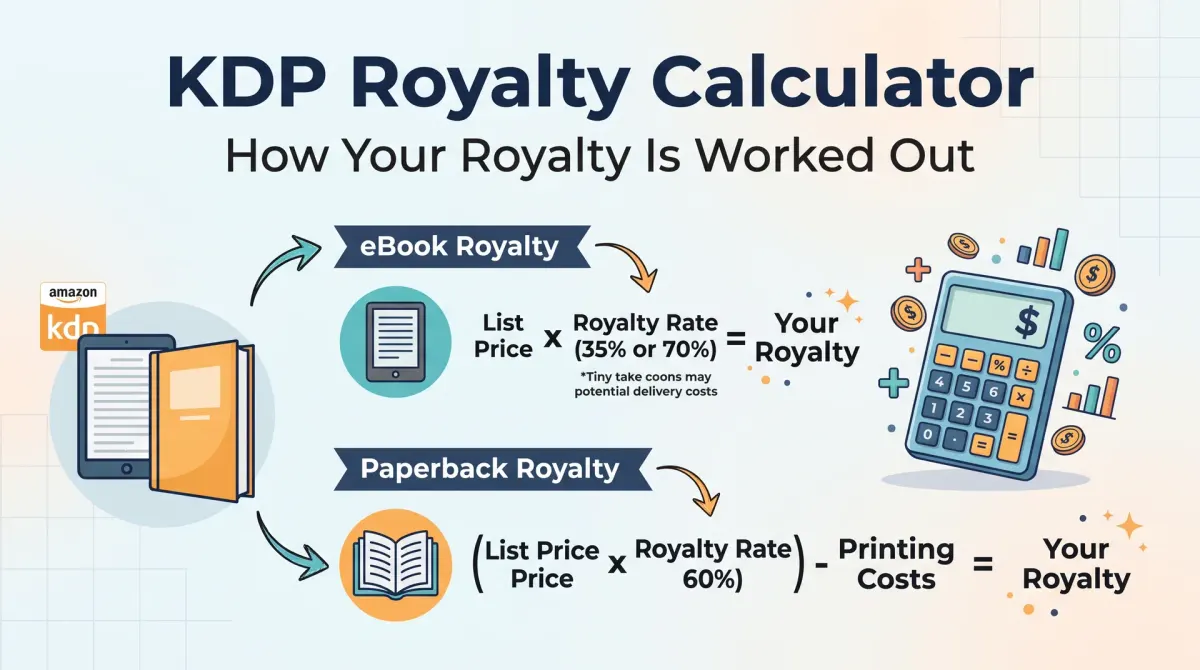
A KDP royalty calculator works out what you earn per sale. For print books, the royalty is a percentage of the list price minus the printing cost. For ebooks, it is a percentage of the list price, and delivery cost can apply under the 70 percent option.
Every royalty calculation uses the same ideas. Start with the list price. Apply the royalty rate for the format. Subtract the printing cost for print books, or the delivery cost for ebooks on the 70% option.
A calculator saves you from doing this by hand, and it lets you test different prices quickly.
Paperback and hardcover royalty
Key takeaway: For print, the royalty is 60% of list price minus the printing cost. The printing cost rises with page count.
KDP states printing cost as a fixed amount plus a cost per page, which depends on trim size, ink type and marketplace. Here is a worked example for a 6 x 9 black-and-white book on Amazon.com.
- Fixed cost: $1.00.
- Per page: $0.012.
- 250 pages: $1.00 + 250 x $0.012 = $4.00.
- At $12.99, 60% is $7.79. Royalty: $7.79 - $4.00 = $3.79.
- At $9.99, 60% is $5.99. Royalty: $5.99 - $4.00 = $1.99.
Lowering the price by $3 cut the royalty almost in half. Test several prices before you decide.
KDP also sets a minimum list price, so that the royalty is not negative. The calculator will warn you.
Ebook royalty
Key takeaway: The 70% option pays more only inside the price band and takes a delivery cost.
For ebooks, KDP offers two royalty options. The 35% option applies to many price points. The 70% option applies only when the list price falls within a set band for each marketplace. On Amazon.com the band is $2.99 to $12.99. A delivery cost based on file size is taken from the 70% option.
Here is an example. An ebook at $4.99, 2 MB, with a delivery cost of $0.15 per MB:
- 70% option: 0.70 x $4.99 = $3.49. Less $0.30 = $3.19.
- 35% option: 0.35 x $4.99 = $1.75.
At this price, the 70% option pays more. If your file is full of images and large, the delivery cost grows. Check the current rates on the KDP pricing page.
Expanded Distribution
Key takeaway: Selling through other channels pays a lower print royalty. Run the numbers before you opt in.
Expanded Distribution lets KDP put your paperback into other retailers and libraries. The royalty is 40% of list price minus printing cost, rather than 60%. For the $14.99 book with a $4.60 printing cost, that is 0.40 x $14.99 - $4.60 = $1.40.
Sales through Expanded Distribution may still be worth it if they bring new readers. Just make sure the price still leaves a profit.
Why your real royalty may differ
Key takeaway: The calculator gives an estimate. Taxes, returns and currency can change the final figure.
- Taxes. Some marketplaces add taxes that affect the figure.
- Returns. Returned orders reduce royalty.
- Currency. Sales are converted to your payment currency.
- Printing cost changes. Cost can differ by marketplace.
- Colour and paper. Premium colour and cream paper change the cost.
Treat the calculator as a planning tool. Use reports and payments for final numbers.
How to pick a price
Key takeaway: Choose a price that leaves a fair royalty and matches your category.
- Find the printing cost for your trim, ink and page count.
- Look at similar books in your category and note their prices.
- Calculate the royalty at three prices.
- Pick the price that gives a royalty you accept and sits near the market.
- Test and adjust after a few weeks of data.
A price table you can copy
Key takeaway: Build a small table for your own book. It shows at a glance how price changes your royalty.
Take the 6 x 9 black-and-white book with 300 pages, which costs $4.60 to print on Amazon.com. Here is how the royalty changes with price.
| List price | 60% of price | Printing cost | Royalty |
|---|---|---|---|
| $9.99 | $5.99 | $4.60 | $1.39 |
| $12.99 | $7.79 | $4.60 | $3.19 |
| $14.99 | $8.99 | $4.60 | $4.39 |
| $17.99 | $10.79 | $4.60 | $6.19 |
Make the same table with your own printing cost and the prices of similar books in your category. Mark the price where the royalty gives you what you need. This turns a guess into a decision.
Mistakes to avoid when pricing
Key takeaway: Cheap is not always better. A price that is too low can hurt both your income and how readers see the book.
The first mistake is pricing without checking the printing cost. A low price on a long book can leave a few cents, or nothing. The second is copying a competitor's price without checking whether your costs are the same. A different page count or trim size changes everything.
The third is ignoring the market. Readers compare prices, and a very high price on a new author's book can hold back sales. A very low price can signal low quality. Look at the range in your category and aim for the middle or just above if your book offers more.
The fourth mistake is never testing. You can change your price at any time. Try one price for a month, record the sales and the royalty, then try another. Compare total royalty, not only the number of sales.
Finally, remember Expanded Distribution. If you opt in, check that your price still leaves a royalty at the lower 40% rate.
Break the formula into parts
The print formula has three parts: list price, royalty rate and printing cost. Multiply the list price by the royalty rate. Subtract the printing cost. The result is your royalty per copy.
Write the three numbers on paper before you use a tool. This helps you spot errors.
Remember that printing cost changes with page count and trim size. A longer book costs more to print and leaves less royalty at the same price.
A worked print example
Suppose a paperback has a list price of 15.00, a royalty rate of 60 percent and a printing cost of 4.00. The rate gives 9.00. After the printing cost, the royalty is 5.00.
If you raise the price to 17.00, the rate gives 10.20. After printing cost, the royalty is 6.20. A small price change can raise the royalty by more than the price change.
These figures are examples only. Use the real rates and costs from KDP for your book.
Ebook royalty basics
Ebooks have two main royalty options with different rates and price conditions. One may include a delivery cost based on file size. Read the conditions on the KDP page for the current rules.
Images make files larger. A large file can raise the delivery cost under the higher rate.
Check the price range allowed for each option and your marketplaces.
Expanded distribution
Expanded Distribution makes your print book available to some other sellers. The royalty rate is lower than for sales on Amazon. Check the current terms.
It can add reach, but the lower rate means you should check that the book still earns a fair amount at your price.
Why real payments differ
Taxes, currencies, returns and timing can change what you see. Printing cost can change with updates to the book.
Keep a record of your calculations and compare them with payments.
Pick a price with a table
Make a table of three prices. For each, compute the royalty. Add your estimate of sales at each price based on similar books. Choose the price that balances royalty and demand.
Review after a few months.
Avoid pricing mistakes
Do not price below printing cost. Do not copy another author without checking your own costs. Do not forget to check each marketplace.
A price table you can copy
Make a table with three price points for your paperback. For each price, write the royalty rate result, the printing cost and the final royalty. Add a column for what similar books charge.
Use the same layout for the ebook, with the royalty option and any delivery cost. Update the table when you change the page count or trim size.
Share the table with your future self. When you plan a promotion, you will know how low the price can go.
Mistakes to avoid
Do not guess the printing cost. Do not ignore the marketplaces. Do not forget that a longer book costs more to print. Do not price below the cost that leaves a fair royalty.
Do not change prices too often. Each change makes it harder to see what works.
Finally, do not trust a single example. Check the calculator for your own book.
Check your royalty after every change
Your royalty can move when anything in the book changes. A new page count changes the printing cost. A new trim size changes it too. A change of paper, a colour page or a bigger file can alter it as well.
After each edit, rerun the calculator before you upload. Compare the new royalty with the old one and decide whether the price still makes sense.
Keep a dated note of every price and the reason for the change. Six months later, you will be able to link the price to your sales and learn what your readers accept. This habit costs a few minutes and protects your income over the long term.
People also ask about KDP royalties
How are KDP royalties calculated?
For print books, KDP pays a percentage of the list price after the printing cost is taken out. For ebooks, the rate depends on the option you choose and the price range. Check the current KDP pages for exact rates and conditions in each marketplace.
Why is my royalty lower than I expected?
Printing cost, tax, marketplace, currency and returns all affect the final amount. The printing cost depends on page count, trim size, paper and colour. Use a calculator before you set a price and check your reports for details.
What price should I set for my book?
Set a price that leaves a fair royalty and fits what readers expect in your category. Compare similar books. Test a few prices in a calculator. Adjust later with your reports, but avoid changing too often.
Use the calculator as a habit
Run the numbers before every launch, edition change or price test. A minute of arithmetic protects your income.