What print on demand means
Key takeaway: With POD, an order triggers the print. Nothing sits in a warehouse waiting to be sold.
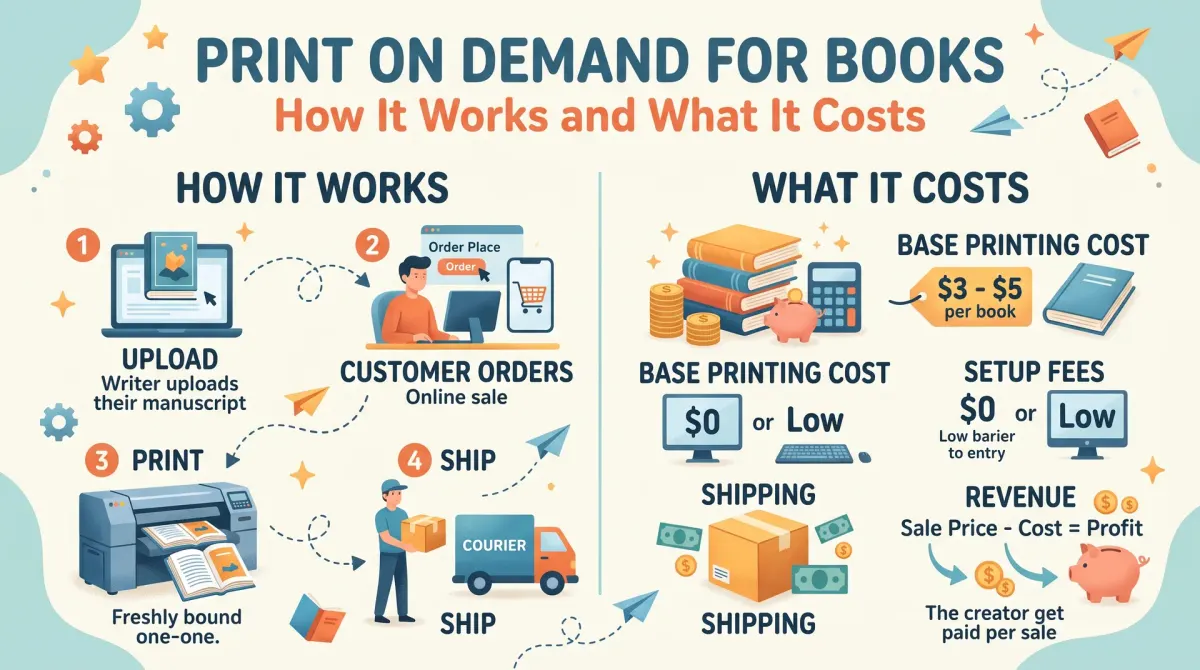
Print on demand for books is a way of printing a copy only after a reader orders it. The platform prints, packs and ships each copy, and takes the printing cost from the sale price. This means no stock, no upfront printing bill and a lower risk for the author.
In the old model, a publisher printed thousands of copies, stored them and hoped to sell them. If the book did not sell, the stock was wasted. POD removes that risk. Your files sit on the printer's system. When a reader orders, the printer makes one copy and ships it.
This is why a new author can publish a paperback with no upfront cost. It is also why books can stay available for years without storage.
How the money works
Key takeaway: The printing cost comes out of each sale. Work out the royalty before you set a price.
On KDP, a paperback earns 60% of the list price minus the printing cost. Printing cost depends on the page count, trim size, ink and paper.
Here is a worked example for a 6 x 9 black-and-white book with 300 pages on Amazon.com.
- Printing cost: $1.00 + 300 x $0.012 = $4.60.
- At $12.99, 60% is $7.79. Royalty: $7.79 - $4.60 = $3.19.
- At $16.99, 60% is $10.19. Royalty: $10.19 - $4.60 = $5.59.
Notice that a longer book costs more to print. At 400 pages, the cost is $1.00 + 400 x $0.012 = $5.80, so the same $14.99 price leaves less for you.
POD vs offset printing
Key takeaway: POD removes risk. Offset reduces cost per copy when you can sell large numbers.
| Point | Print on demand | Offset printing |
|---|---|---|
| Upfront cost | None | Large order paid first |
| Cost per copy | Higher | Lower at volume |
| Stock | None | You store and ship |
| Minimum order | One copy | Often hundreds or thousands |
| Speed to start | Fast | Slower |
| Best for | New authors, tests | Proven sellers, events |
A common path is to start with POD, prove demand, then consider offset printing for a restock or for events where you sell many copies.
Quality: what to expect
Key takeaway: POD quality is good for most books. Check colour, paper and cover finish with a proof.
Modern POD printers produce clean text and sharp covers. Colour images can look different from the screen. Paper choices are limited compared with offset printing. Cover finishes are usually matte or glossy.
Always order a proof. Look at the margins, the image quality, the spine and the cover colours. If you plan a photo-heavy book, compare printers before you commit.
Distribution through POD platforms
Key takeaway: Your reach depends on the platform and the distribution option you choose.
KDP sells mainly on Amazon stores, and offers Expanded Distribution at a lower royalty to reach other sellers. IngramSpark connects to a wide network of retailers and libraries. Lulu offers its own store and other channels. Check the current terms of each.
Bookshops may be careful about POD books if the terms are poor, for example a low discount or no returns. If bookshop sales matter to you, read the platform's terms for trade discount and returns.
When to choose POD
Key takeaway: POD suits almost every first book. Offset printing is a later decision.
Choose POD if:
- you are publishing for the first time
- you want to test a topic or title
- you do not want to store or ship books
- you plan to update the book often
Think about offset if you have proven sales, run events or talks, or sell directly to organisations in bulk.
Trim size and page count affect your costs
Key takeaway: Two books with the same words can cost very different amounts to print. Layout choices matter.
Printing cost grows with the number of pages. A book set in a small font with tight margins can have fewer pages than the same text in a large font. But readers need comfortable type, so do not shrink it too far. A good rule is to test the layout on a proof and read a few pages.
Trim size also matters. A larger trim fits more words per page, which reduces the page count. It may also change the cost per page, so check the printing cost table for the trim size you pick. Common sizes for non-fiction include 5.5 x 8.5 and 6 x 9 inches. Check which sizes your platform supports.
Interior colour is the biggest cost driver. A colour interior costs far more per page than black and white. If your book has only a few images, consider keeping them in black and white, or placing them on fewer pages.
Think about paper too. White paper suits most non-fiction, and cream paper is common for novels. Cream paper is slightly thicker per page, which makes the spine wider.
Order proofs and author copies wisely
Key takeaway: Proofs protect your reputation. Author copies help with events and reviews.
A proof copy is a printed copy you check before you publish. It shows margin problems, cover colours and typos. You pay the printing cost plus shipping and tax. Order one proof at a time and fix all problems before you order the next.
Author copies are printed at the same cost and shipped to you. They are useful for giving to reviewers, selling at events or sending to libraries. Check that the platform allows you to resell author copies, and keep records of your costs.
Ordering a few copies early also lets you test the shipping time. Readers who order from you directly will want to know when they can expect their book.
Follow the money
When a reader pays the list price, the retailer takes its share, the printer takes the printing cost and you receive the rest as a royalty. The printing cost depends on page count, trim size, paper and colour.
Use a calculator to see the royalty at your price. A higher page count means a higher cost.
This model protects you from unsold stock but leaves a smaller margin per copy than a large offset run.
Check quality with a proof
Order a proof before you publish. Check the paper, the cover finish, the spine, the margins and the text sharpness. Check images and colours.
Compare a proof from more than one platform if quality matters to you.
Keep notes on what you see and fix problems in the files.
Distribution through print on demand
Print on demand platforms can list your book in their own stores and, in some cases, make it available to other sellers. Reach to bookshops and libraries differs by platform.
If you want bookshop shelves, ask how the platform handles returns and discounts. Many shops are cautious about print on demand books.
Read the platform terms for each option.
Trim size and page count affect cost
A bigger trim size or a longer book costs more to print. Colour pages cost much more than black and white ones.
Try different trim sizes and fonts to see how the page count changes. A small change in layout can save pages.
Plan author copies
Order author copies for events, gifts and review copies. Check the shipping time and cost. Order early before a launch.
Keep a few copies for your own records.
When to consider offset
If you expect to sell a large number of copies, offset may lower the cost per copy. You will need space to store the books and money to pay upfront.
Test the market with print on demand first.
Pros and cons in plain terms
The main benefits of print on demand are low risk, no stock and the ability to update a book. You can fix a typo and upload a new file. You can test a book without a large bill.
The main drawbacks are a smaller margin per copy, limits on finishes and variable quality between prints. Some bookshops are cautious about print on demand books, and discounts can be tight.
Weigh these against your goals. For most first books, the benefits win.
Check your files before you order
Print on demand works best with clean files. Use the platform's template or size guide. Keep text inside the margins. Embed fonts. Use images at a good resolution.
Check the cover against the calculator. Look at the previewer for warnings. Print on demand does not forgive file errors, since a copy is printed as it was uploaded.
Order a proof after every major change.
Updating a book safely
You can upload a new file at any time, but readers who bought earlier keep the old version. Make changes in batches, so you do not upload weekly.
Keep a change log. When you fix important mistakes, note the edition or the date on the copyright page.
If you make large changes, consider a new edition with its own ISBN.
Choosing a platform
Compare platforms on printing cost, quality, distribution, royalties, tools and support. Read their terms on rights and exclusivity. Order a proof from each if the book matters to you.
Some authors use one platform for sales on a major store and another for wider distribution. If you do, manage ISBNs and files with care, and follow each platform's rules on duplicate listings.
Keep a table with your findings and the date. Terms change, so review it once a year.
People also ask about print on demand
Is print on demand good quality?
Quality is good for most books, but it varies by platform, paper and cover finish. Order a proof to check the print, the cover and the binding. If you need special finishes or colour accuracy, compare platforms or consider offset printing.
Does print on demand cost money upfront?
Platforms such as KDP charge no setup fee, so there is no upfront printing bill. You pay for proof and author copies, and the printing cost for each sale comes out of the price. Other platforms may have their own fees, so check the current terms.
When is offset printing better than print on demand?
Offset printing can cost less per copy for large print runs, and it may allow special finishes. It needs money upfront and storage for stock. It suits authors who sell many copies at events or to bookshops. Many authors start with print on demand and switch later.
Make a sensible start
For most authors, print on demand is a low-risk way to publish. Use it to learn, test and grow.