What AI can do well
Key takeaway: AI is strong at starting, structuring and tidying. It is weak at original insight and checked facts.
The best AI to write a book is the tool that suits the job you give it, because no single AI does everything well. Chat assistants help with outlines and feedback, writing apps help with structure, and none replace your voice, your facts or your final checking.
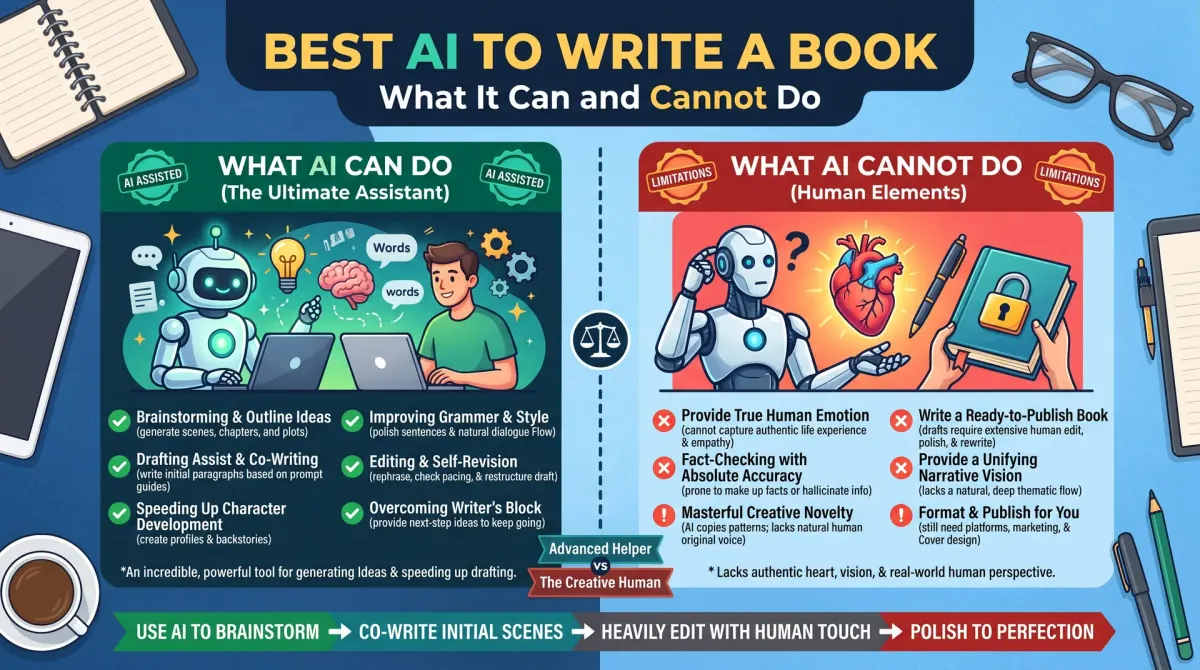
AI tools are fast at tasks that have clear patterns. They can suggest chapter outlines, list questions a reader may have, offer different ways to phrase a sentence and point out repeated words. They can summarise your own notes and turn rough bullet points into clean sentences, which you then rewrite in your voice.
They are also useful for feedback. You can paste a chapter and ask which parts are unclear, where the pace drops or what a new reader might not understand. Treat the answer as one opinion, and compare it with human readers.
What AI cannot do
Key takeaway: AI does not know your life, your readers or the facts of your topic. It predicts words, and it can sound sure while being wrong.
AI cannot give you real experience. It has not run your business, raised your child or lived your story. When a book depends on trust, your own knowledge is the product.
AI can also invent. It may make up statistics, quotes, studies and links. It may mix up dates, prices and rules. Every fact in your book must be checked against a real source. This matters most for books about health, money, law and platform rules.
Long AI drafts often repeat ideas, use generic phrases and share the same smooth tone. Readers notice. A book that sounds like everyone else is hard to sell.
Types of AI writing tools
Key takeaway: Choose the type by the job. The type matters more than the brand.
| Type | Good for | Watch out for |
|---|---|---|
| General chat assistant | Brainstorming, outlines, feedback | Invented facts, generic tone |
| Writing-focused app | Story structure, scene tools | Locked formats, subscription cost |
| Grammar and style checker | Clean-up, clarity | Over-correcting your voice |
| Research assistant with sources | Finding leads to check | Sources must still be read |
| Voice-to-text | Fast first drafts | Needs editing |
Read each vendor's page for current features, prices and data rules. Check whether the tool keeps your text for training and whether you can opt out.
KDP rules for AI content
Key takeaway: Disclose AI-generated content when you publish. You must also follow KDP's general content rules.
KDP asks authors to tell it when text, images or translations are AI-generated. It treats content you edit heavily with AI help differently from content a tool generated. Answer the question honestly, and read the current content guidelines for the exact wording.
KDP can also remove books that are low quality, misleading or copied. A book made quickly from AI output with no checking is at risk.
Copyright and AI
Key takeaway: Human authorship matters for copyright. Keep notes of what you wrote and what you changed.
The US Copyright Office has said that works need human authorship to be protected. Material produced by AI without human creative input is generally not protected. Your own writing, and your original selection and arrangement of material, can be protected. Rules differ by country and are still developing.
Keep drafts and notes that show your own work. If you register a copyright, follow the Office's current guidance on disclosing AI-generated material.
A safe workflow
Key takeaway: Use AI as an assistant at the edges. Keep the thinking, the voice and the checking yourself.
- Write the book idea and outline in your own words first.
- Ask AI to find gaps, suggest questions and point out unclear parts.
- Write each chapter yourself, using your own examples.
- Use AI to suggest alternative phrasing, and choose only what fits your voice.
- Check every fact, number and quote against a source.
- Read the book aloud and fix lines that do not sound like you.
- Answer the KDP disclosure question honestly.
Signs your book sounds like AI
Key takeaway: Repetition, vague claims and empty phrases are the usual signs. Cut them.
- Many sentences open the same way.
- Claims such as "studies show" with no study named.
- Lists of three items in every paragraph.
- Summary paragraphs that repeat the previous section.
- No examples from real life.
Replace each with a specific example, a number you can verify or a story from your own experience.
How to judge an AI tool before you use it
Key takeaway: Test the tool on a small task. Judge the result, the data rules and the cost.
Run the same test on each tool you consider. For example, paste a short passage of your own writing and ask for a clearer version. Compare the results. Did it keep your meaning? Did it add facts you did not give? Did it flatten your voice?
Read the data rules. Find out whether your text is stored, used for training or shared. If the book contains private or sensitive material, choose a tool that lets you control this.
Check the cost over a year, not a month. Compare a free plan, a paid plan and the cost of simply hiring an editor for a chapter. The cheapest tool is not always the best value.
Where to be extra careful
Key takeaway: Some topics need your own expertise and checked sources. Do not hand them to a tool.
Be careful with health, money, law and safety advice. A wrong claim can harm readers and damage your name. Be careful with quotes, case studies and statistics. Never use one that you have not checked at its source. Be careful with platform rules, prices and dates, which change often.
When in doubt, write it yourself, cite a real source and say when the information was checked.
Match each AI job to the right kind of tool
Think in jobs, not brands. For brainstorming and outlines, a general chat assistant is quick. For rewording and grammar, a style checker works well. For research leads, a tool that shows its sources helps, as long as you open every source. For dictation, a voice-to-text tool gets the first draft down fast.
Write the jobs you need on a list. Test one tool per job with the same small sample. Keep notes on what worked and what did not. This beats chasing every new release.
If a tool needs access to your whole manuscript, check its data rules first. Some keep your text for training. Choose settings that protect private or sensitive material.
How to ask AI for useful feedback
AI feedback is only as good as your request. Say who the reader is and what the book should do for them. Paste one chapter at a time. Ask specific questions, such as "Where might a new reader get lost?" or "Which paragraphs repeat the same point?"
Ask for reasons, not rewrites. A note that explains the problem is more useful than a polished paragraph in a voice that is not yours. Then fix the problem in your own words.
Compare AI feedback with the view of a human reader. Where both agree, act on it. Where they disagree, trust your own judgment of your reader.
A checking routine for facts and quotes
AI can state wrong things with confidence. Build a routine to catch them. Mark every claim that could be checked, such as a date, a number, a name, a quote or a rule. Check each one against a primary source.
For platform rules, use the platform's own help pages. For laws, use official sites. For research, find the study itself. If you cannot confirm a claim, cut it or rewrite it as a clear opinion.
Keep a source list as you go. It helps your Sources section and your own memory. It also protects you if a reader questions a statement.
Protecting your voice
Readers connect with a voice. If every chapter sounds smooth and the same, the book loses character. Use AI at the edges, and write the core sentences yourself.
Read each chapter aloud. Mark lines that sound like no one in particular. Replace them with a detail from your life or work, a specific example or a plain statement of what you think.
Keep a style note. List words you like, words you avoid and how you address the reader. Check new text against it.
Costs, plans and data rules
AI tools differ in cost and in how they treat your data. Some are free with limits. Some charge by month or by use. Read the plan details on the vendor page and note the renewal terms.
Compare the yearly cost with the cost of a human editor for one chapter. AI is not always the cheaper option once you add your checking time.
Revisit your choice every few months. Tools change fast, and so do their rules.
Common mistakes when using AI for a book
The most common mistake is to accept the first output. AI often gives a smooth but shallow answer. Ask follow-up questions, give it your notes and require specific examples.
Another mistake is to skip the facts check because the text sounds right. Wrong dates, invented studies and false rules slip in easily. A single error can damage trust in the whole book.
A third mistake is to hide AI use when a platform asks about it. Answer the disclosure question honestly. Hiding it risks your account, and it is not worth it for a book.
A fourth is to forget the reader. AI does not know who will read your book. You do. Keep the reader's problem at the centre of each chapter.
People also ask about AI and book writing
Is it okay to use AI to write a book?
Yes, if you follow platform rules and stay honest. KDP asks you to disclose AI-generated content when you publish. You remain responsible for accuracy and rights. Many authors use AI for brainstorming and feedback and write the text themselves, which keeps the voice and lowers the risk.
Which AI is best for fiction writing?
No tool is best for every writer. Some chat assistants suggest plot options and character questions well, and some apps offer scene and story tools. Try a few on a small task with your own notes. Judge the result by how well it keeps your style and your story.
Can AI-written books sell on Amazon?
They can be listed if they follow KDP rules, but quality decides sales. Readers notice generic or repeated text, and weak reviews hurt. A book with real expertise, clear structure and careful editing has a better chance than raw AI output. Always disclose AI-generated content when asked.
Where to start today
Pick one job, such as an outline review. Choose one tool and one chapter. Write your own notes first, then ask for feedback. Keep what helps and drop the rest.