What each tool is
Key takeaway: All three are book formatting tools. They differ in price, design choice and where they run.
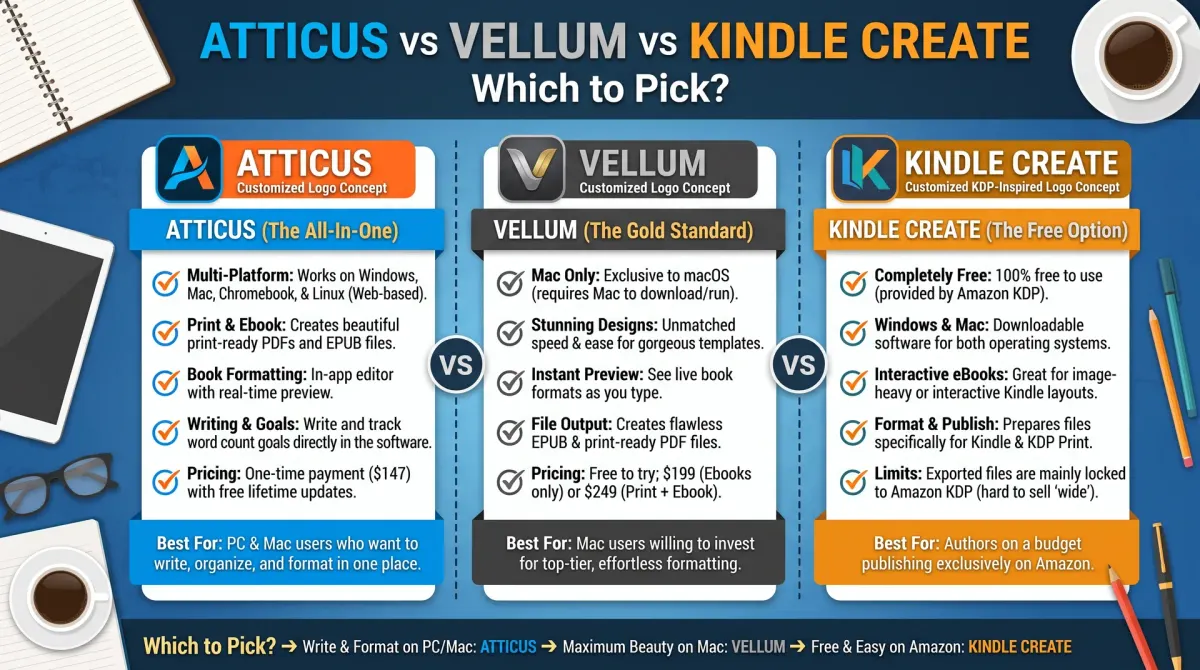
Atticus vs Vellum is a common comparison between two book formatting tools. Atticus works in a browser and on several systems. Vellum runs on Mac and is known for its polished templates. Kindle Create is Amazon's free option. Each turns a manuscript into print and ebook files.
Kindle Create is free software from Amazon. It prepares ebooks and print books for KDP. It offers a set of themes and checks files against KDP rules.
Atticus is a paid formatting and writing tool from an independent company. It aims to cover writing and formatting in one place.
Vellum is a paid formatting tool known for polished book layouts. It has a reputation for clean designs and has been built mainly for Mac. Check its current system requirements on the vendor page.
Before you decide, read each vendor's own pages for current prices, supported systems and features.
Side by side
Key takeaway: Use this table as a checklist. Fill in the blanks from each vendor's current page.
| Point | Kindle Create | Atticus | Vellum |
|---|---|---|---|
| Maker | Amazon | Independent company | Independent company |
| Cost | Free | Paid, check vendor | Paid, check vendor |
| Ebook files | Yes, for KDP | Yes | Yes |
| Print files | Yes, for KDP | Yes | Yes |
| Design choices | Fewer themes | More options | Many polished styles |
| Where it runs | Check Amazon page | Check vendor page | Check vendor page |
| Best for | Free, KDP-first | All-in-one writing and formatting | Polished layouts |
Do not rely on this table alone. Features and prices change, so confirm each row.
How to choose
Key takeaway: Decide by budget, platform, and how much design control you want.
- Budget is tight. Start with Kindle Create. It costs nothing, and you can switch later.
- You publish on several stores. A paid tool that exports files for many stores may save time.
- You want polished design. Test the sample books from each tool and compare them on a real proof.
- You do not own the right computer. Check what systems each tool supports before you try.
- You hate learning software. Pick the tool with the simplest start and good help pages.
A fair test
Key takeaway: Format the same chapter in each tool and compare the proof, not the sales page.
Take one chapter with a heading, a list, a table and a picture. Format it in each tool. Then compare:
- How long did it take?
- How does the print PDF look at the page edges?
- Does the ebook look right on a Kindle preview?
- Did the tool flag problems?
- Can I export what I need for each store?
Order a printed proof of the best result. A real page in your hand shows spacing problems that a screen hides.
When to hire a formatter instead
Key takeaway: A formatter is worth considering for complex layouts such as tables, images or poetry.
Software handles simple books well. Complex books, such as cookbooks, workbooks, photo books and technical books, may need a human formatter. Ask for a sample, a written quote and the final source files.
Check the output against KDP rules
Key takeaway: No tool guarantees acceptance. Always preview and proof.
KDP checks every file. Use the online previewer and order a proof for print books. Margins, bleed and image resolution are common causes of problems. Read the KDP help pages for the current requirements.
What formatting actually changes
Key takeaway: Good formatting is invisible. Readers notice only when it is wrong.
Formatting controls how your words sit on the page and on the screen. In print, it sets the margins, the gutter, the font size, the line spacing, the chapter starts and the page numbers. In an ebook, it controls how text flows when the reader changes the font size, how the table of contents works and how images and links behave.
Poor formatting shows up as tiny text, cramped margins, uneven spacing, missing page numbers or a table of contents that does not work. Readers rarely complain about good formatting, but they will mention bad formatting in reviews.
All three tools exist to remove this work from you. They apply a consistent style, so every chapter looks the same, and they export files that platforms accept.
Questions to ask before you buy
Key takeaway: Ask what you will use every month, not what looks impressive on the sales page.
- Will I publish only on KDP, or on several stores?
- Do I need both print and ebook files?
- Do I use images, tables or special characters?
- Do I need a table of contents with links?
- Will I make many books, or just one?
- Is the price a one-time fee or a subscription?
- What support is available if something breaks?
If you write one book, a free tool may be all you need. If you plan to publish many books, a paid tool that saves an hour on each book can pay for itself. Do the maths with your own numbers. Divide the price by the hours you save to see the hourly value.
Free trials and samples
Key takeaway: Test with your own manuscript. A sample book never shows your real problems.
Many tools let you try the software or export a sample. Use your own chapter, with your own headings, lists and images. Look at three things in the result: how the text fits the page, how the headings look, and whether the table of contents links work. If the vendor offers a trial of the print export, take it. Print files are harder to get right than ebook files.
Keep notes on every tool you test, with a score from one to five for ease, look and export. You will forget the details otherwise.
Check system and file support first
Before you compare features, check the basics. Does the tool run on your computer? Does it export the files you need for print and ebook? Can it handle your trim size?
Vellum needs a Mac. Atticus runs in a browser and on other systems. Kindle Create is a free download from Amazon. If your computer rules a tool out, the rest does not matter.
Also check whether the tool can import your manuscript cleanly. Open a file with headings, italics, lists and a few images. See what survives the import.
Look at price models, not just prices
Tools price their products in different ways. Some charge once. Some charge by feature. Some use a subscription. Prices change, so read the vendor page on the day you buy.
Ask three questions. What do I get for the price? Can I export my files if I stop paying? What happens when the software updates? A tool that locks your files in a format only it can open is a risk.
Compare the price with the cost of hiring a formatter for one book. If you will publish many books, a tool often pays for itself. If you will publish once, a formatter or a free tool may cost less.
Templates and layout control
Templates decide how chapter openings, headings, dropped caps and breaks look. A good template gives a professional feel with little effort.
Look at the sample books each tool shows. Is the style close to your genre? Can you change fonts, spacing and ornaments without breaking the layout? Can you save your settings as a style for the next book?
If you want a very custom design, check how far the tool lets you go. Some tools favour consistency over freedom.
Support and updates
A tool is only useful if it keeps working. Check how the vendor handles support. Is there a help centre, a user community and a way to reach a person? Are updates regular? Do release notes explain changes?
Search for user reports of problems with print files or KDP uploads. Remember that reviews reflect individual cases. Test the tool yourself.
Test one chapter in each tool
The best test is a real one. Take a chapter with headings, a list, a quote, a table and an image. Import it into each tool. Apply a template. Export a print PDF and an ebook file.
Check the print PDF page by page. Are the margins safe? Do headings stay with their text? Are there lonely lines at the top of a page? Check the ebook on a phone and a tablet. Does the table of contents link work? Do images scale?
Upload the files to the KDP previewer. Note every warning. The tool that gives the cleanest result with the least effort is usually the right choice. Write down the settings you used so the next book is quick.
When to hire a formatter instead
Some books are better handled by a person. If your book has many images, tables, footnotes, poems or an unusual layout, a formatter may save time and avoid errors. The same goes if you are short on time or do not enjoy design work.
A formatter also helps if you plan several editions, such as a large print or a workbook version. Ask for the source file so you can update the book later.
Compare the quote with the cost of the software and the hours you would spend. For a single complex book, the human option can be cheaper overall.
People also ask about Atticus and Vellum
Is Atticus better than Vellum?
Neither is better in every case. Atticus runs on more systems and combines writing with formatting. Vellum is Mac only and is praised for its templates and clean output. The better tool is the one that works on your computer, fits your budget and passes the KDP previewer with your book.
Is Kindle Create good enough for KDP?
For simple books, yes. Kindle Create is free and made by Amazon, so it matches KDP rules well. It has fewer layout options than paid tools. If your book has many images, tables or special layouts, test it first or consider another tool or a formatter.
Do I need formatting software to self-publish?
No. You can format with a word processor and export a print-ready PDF. Formatting software saves time and gives a more polished result, especially for ebooks and complex layouts. If your book is a plain text novel, a careful word processor file may be enough.
Make your decision
Run the same chapter through each tool, check it in the KDP previewer and order one proof. Choose the one that gives clean files with the least fuss. Write down your settings so the next book is faster.