Choose the age group first
Key takeaway: The age group decides length, language and layout. Decide it before you write a word.
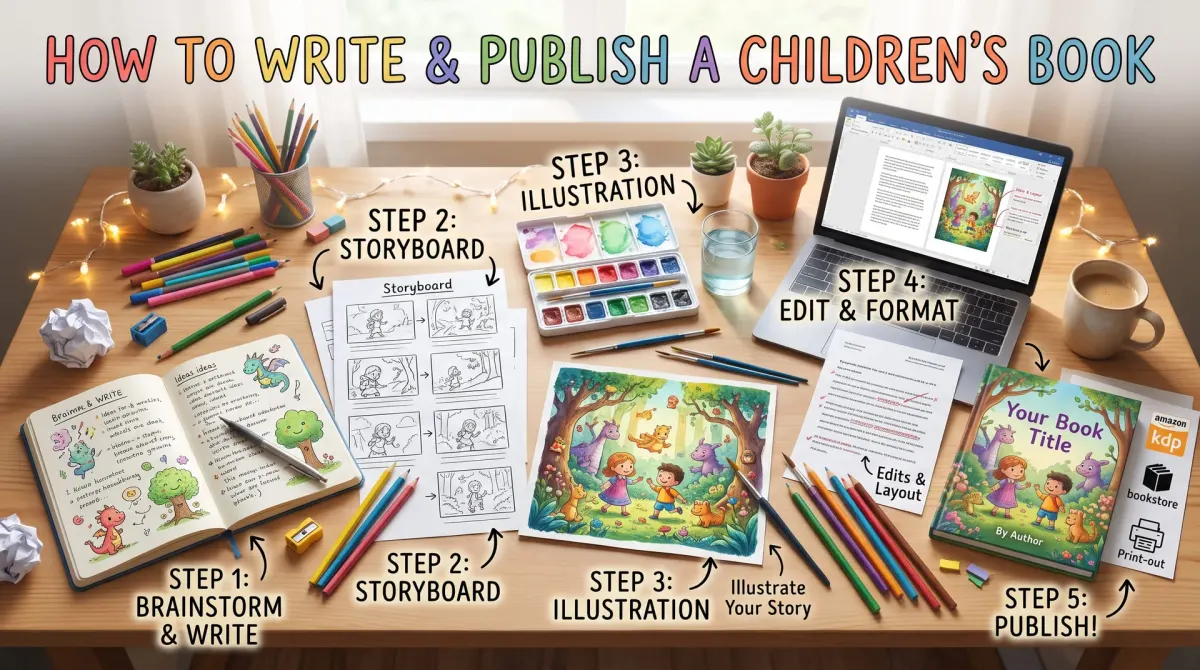
To write and publish a children's book, you choose an age group, write short text that works across page turns, find or hire an illustrator, set a trim size and page count, build print and ebook files and publish through a platform such as KDP.
Children's books are grouped by age. Board books are for babies and toddlers. Picture books are for young children and rely on pictures and short text. Early readers use simple words and short sentences for children learning to read. Chapter books and middle-grade books use longer text with few or no pictures.
Look at the top books in your chosen group. Note the length, the number of pages, the size of the type and the amount of text on a page. Your book should feel at home next to them.
Write for the page
Key takeaway: A picture book is written as a set of page turns. Each page should have a small picture-worthy moment.
Picture books are often planned in page spreads. Many are around 32 pages, though layouts vary, and some pages are used for the title page and copyright page. Plan the story across the available pages before you write the final text.
Make a simple storyboard. Draw a box for each page or spread. Write one line about what happens. Check that the pictures can show something new each time, so the illustrator has a job and the child has a reason to turn the page.
Use short sentences and clear words. Read the text aloud, because adults will read it to children many times. Use rhythm and repeat key phrases if it suits the story. Cut any line that the picture can say better.
Find an illustrator
Key takeaway: The illustrator shapes the book. Agree the scope, the cost and the rights in writing.
You can hire a freelance illustrator, use an illustrator you know or illustrate the book yourself. Look at portfolios with a consistent style. Ask whether the illustrator has made children's books before.
Agree these points in a written contract:
- How many illustrations you will receive and at what size.
- The price and the payment schedule.
- The number of revisions.
- Who owns the artwork, and what rights you receive to print and sell the book.
- Whether you may use the art on the cover, in ads and on a website.
- When the files will be delivered, and in what format.
Never use art you do not have the rights to. If you plan to use AI-generated images, read KDP's disclosure rules and the tool's terms first.
Set the format
Key takeaway: Pick a trim size that fits the pictures, then check the printing cost for colour.
Common children's book trim sizes include square formats and tall or wide sizes. Choose one that suits your art, and check that your platform supports it. Illustrated pages need bleed if the art runs to the edge.
Colour interiors cost more per page than black and white. Check the printing cost for your trim size and page count before you set the price. Here is a method. Find the printing cost for your book, set a list price, then work out the royalty. If the royalty is too low, consider a smaller trim, fewer pages, a higher price or a different format.
Build the files
Key takeaway: Print and ebook files are different. Plan both from the start.
For print, you need an interior PDF that follows the platform's margin and bleed rules and a full-wrap cover. For ebooks, picture books need a format that keeps the pictures and text together. KDP has tools for children's ebooks, and their availability can change, so check the KDP help pages.
Use high-resolution images. A common target is 300 pixels per inch at the printed size. Embed fonts in the PDF. Check text near the gutter, because words can disappear into the fold.
Publish and proof
Key takeaway: Always order a printed proof of a children's book. Colour and margin errors are easy to miss on a screen.
Upload your files, enter the details and choose your price. Order a proof copy. Check the colours, the placement of text, the cover and the spine. Read it aloud to a child if you can. Their reaction will tell you more than any checklist.
Fix any problems, upload the new files and publish. After launch, ask parents, teachers and librarians for honest reviews.
Market your children's book
Key takeaway: Parents, teachers and librarians buy children's books. Speak to them, not only to children.
The buyer is usually an adult. A parent wants a book that is fun to read aloud and safe for their child. A teacher wants a book that fits a lesson or a topic. A librarian wants durable books with good reviews. Write your book description for these readers, and say clearly who the book is for and what age it suits.
Offer a free activity sheet, a colouring page or a reading guide. These small extras give teachers and parents a reason to share your book. Visit schools or libraries if you can, and bring a few copies.
Ask for honest reviews from parents and teachers who have read the book with a child. Never buy reviews or ask for payment in exchange for them. A few real, specific reviews help more than many vague ones.
Know your age group
Children read at very different levels. A board book, a picture book, an early reader and a chapter book each have different word counts, themes and layouts.
Look at books for your age group. Note the length, the sentence style and how pictures and text work together.
Write for the child and for the adult who reads aloud. Both choose the book.
Write for the page turn
In a picture book, the story moves with each page turn. Plan a small surprise or beat on each spread.
Keep text short. Leave room for the pictures to tell part of the story. Avoid describing what the illustration will show.
Read aloud many times. Listen to rhythm, repeated sounds and the ending.
Work with an illustrator
Share your story, your age group and your ideas on style. Ask for sample sketches. Agree who owns the art, how you can use it and what credit appears.
Put the agreement in writing. It should cover payment, deadlines, the number of illustrations, revisions and the right to use the art on covers and in marketing.
Be open to the illustrator's ideas. Good pictures can improve the story.
Choose the trim size and page count
Picture books often use square or wide trim sizes, and the platform has a list of allowed sizes. Check the rules for page counts. Print books usually need a number of pages that suits the printing method.
Colour printing raises the cost. Compare the cost for your size and page count before you set a price.
Build the files
Place text and images in a layout tool. Set bleed on pages where art goes to the edge. Keep text away from the trim and the gutter.
Embed fonts. Export a print PDF. Check the ebook version too. Fixed-layout ebooks need extra care.
Use the previewer and order a proof.
Cover and title
The cover must attract both child and adult. Use bright, clear art and a readable title. Test the cover at thumbnail size.
Check KDP rules for AI-made art and disclose where needed.
Publish, proof and share
Publish when the proof looks right. Share with parents, teachers and librarians. Offer a read-aloud video if you like, and collect honest reviews.
Keep your files, your agreement and your licences safe.
Checklist for the print files
Check the trim size, the page count and the bleed. Keep text away from the trim edge and the gutter. Embed fonts. Check images for resolution. Make sure the first and last pages follow the platform rules.
Check the cover against the calculator. Review the barcode area.
Order a proof. Look at colours, page turns and the feel of the pages. Show it to a child and a parent, and watch where they pause.
Marketing a children's book
Parents, teachers and librarians buy children's books. Write a description that speaks to them. Say the age, the theme and what the book offers, such as a calm bedtime or a first counting book.
Offer a free printable or an activity page on your site. Share read-aloud clips if you can. Visit schools or libraries where it is allowed.
Ask for honest reviews from adults who have read the book to a child.
Rights and safety
Keep your illustrator agreement, your licences and your files. Check any image of a real child for permission. Avoid using brand names or characters you do not own.
Follow the platform content rules, and check requirements for books made for children.
Reading level and tone
Match your words to the age group. For young listeners, use short sentences, strong rhythm and familiar ideas. For early readers, repeat key words so that children build confidence.
Avoid lessons that preach. Children enjoy stories that let them discover the point. Humour, surprise and warmth work well.
Test the text with real children if you can. Watch their faces, note where they laugh or lose interest, and adjust. Their reactions are more useful than any guess.
People also ask about children's books
How long is a children's picture book?
Picture books are short, and the length depends on the age group and the format. The page count must suit the printing rules of your platform. Check typical lengths in your category and the platform's page count rules before you plan the story and the illustrations.
Do I need an illustrator for a children's book?
Most picture books need illustrations, and they carry much of the story. You can hire an illustrator, work with an artist you know or create the art yourself. Agree rights and payment in writing. Make sure you can use the art in all formats you plan.
Can I self-publish a children's book on KDP?
Yes. KDP supports ebooks and print books for children. Print books need correct trim size, bleed and page count. Colour printing costs more than black and white. Order a proof, since colours and edges matter in picture books.
Start with a simple project
Your first children's book can be short and focused. Learn from it and make the next one better.