What "free" really means
Key takeaway: The platform is free to join. Quality, time and marketing are where the costs hide.
To publish a book for free, you use a platform such as Amazon KDP that charges no setup or listing fee, combine it with free tools for writing, formatting and cover design, and accept that the platform takes a share of each sale.
When people say they published for free, they usually mean they paid no setup fee. The platform keeps a share of each sale, and for print books, the printing cost comes out of the price. That is the trade: no upfront cost, a smaller royalty per sale.
Free does not mean effortless. You will spend hours on formatting, the cover and the book details. You may also choose to pay for some help later, once the book earns money.
Free platforms
Key takeaway: Several platforms let you publish with no setup fee. Check each one's terms for rights and royalties.
| Platform | What you can publish | Notes |
|---|---|---|
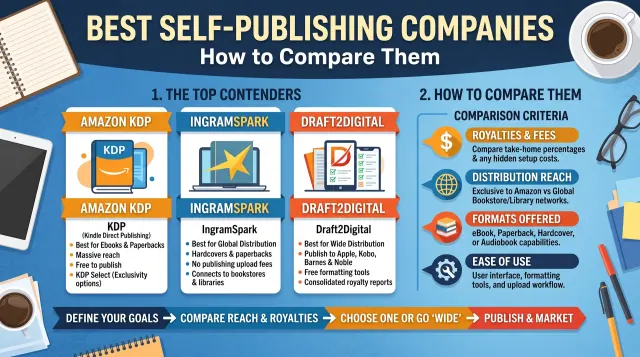
| Amazon KDP | Ebooks, paperbacks, hardcovers | Free ISBN works only on KDP |
| Draft2Digital | Ebooks to many stores | Takes a share of each sale |
| Kobo Writing Life | Ebooks on Kobo | Check terms and countries |
| Apple Books | Ebooks | Needs an Apple device or an aggregator |
| Google Play Books | Ebooks | Check the partner programme |
| Lulu | Print and ebook | Print costs paid per order |
Fees, countries and rules change. Read each platform's own pages before you sign up.
Free tools you can use
Key takeaway: Free tools can produce a clean book if you check the output carefully.
- Writing. A free word processor or Markdown editor.
- Formatting. Kindle Create is free, and word processors can export print PDFs.
- Cover. KDP Cover Creator is free. Free design tools offer templates, but check licences.
- Proofing. Spell checkers and reading aloud catch many errors.
- Calculators. The KDP cover calculator and printing cost tables are free.
Use the KDP previewer to check your files. It shows how the pages and the cover will look.
The free ISBN trade-off
Key takeaway: The free KDP ISBN costs nothing but limits where the print edition can be sold.
KDP assigns a free ISBN for print books. The imprint shows as "Independently published", and the ISBN works only on KDP. If you want your own imprint or to sell the same edition elsewhere, you need your own ISBN. Ebooks on KDP do not need one.
For a first book sold only on Amazon, the free ISBN is fine. If you plan to expand later, think about buying your own now.
What still costs money
Key takeaway: Some costs stay even when publishing is free. Decide which ones you will pay.
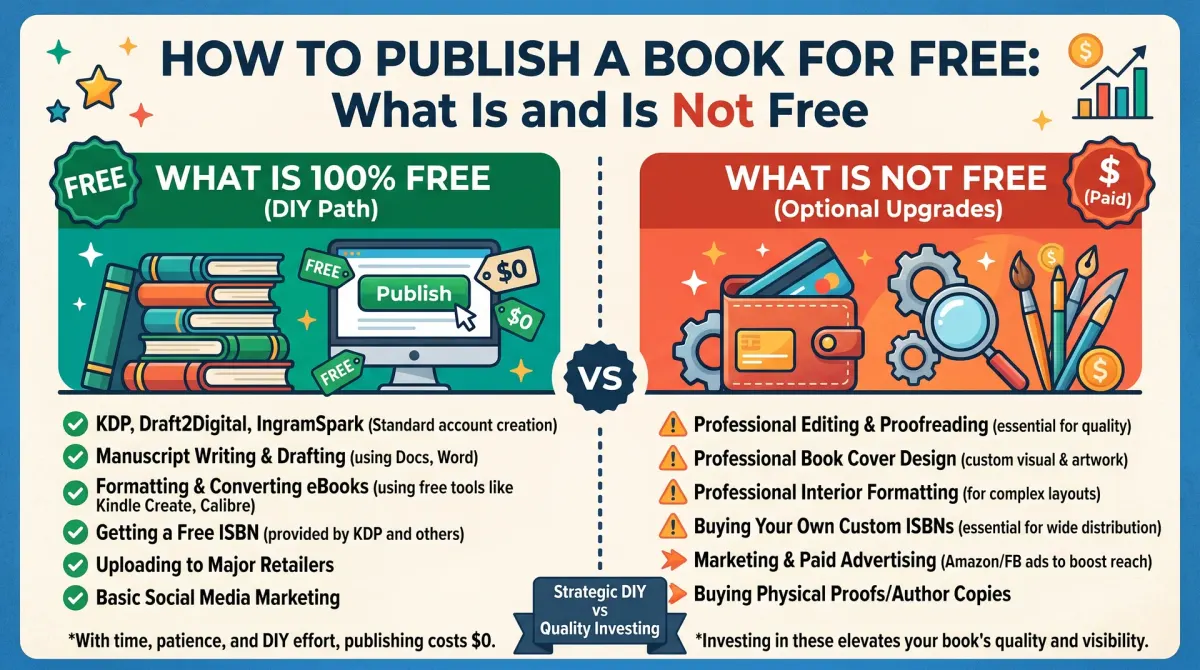
- Proof copies and author copies: printing cost, shipping and tax.
- Editing: you can self-edit, but outside help improves quality.
- Cover design: free tools work for simple covers.
- Your own ISBN if you want one.
- Marketing: ads, a website, an email tool.
A smart approach is to launch with free options and spend the first royalties on the biggest improvement, usually editing or a stronger cover.
Traps to avoid
Key takeaway: A truly free path never asks you for money to be "selected" or "approved".
Be careful with companies that say they publish for free and then sell expensive packages. Be wary of anyone who asks for fees before reading your book, promises sales or takes your rights. Real platforms do not charge to publish. Read contracts, and keep control of your files and rights.
Do not upload text you do not own, such as copied articles or content from public websites. KDP can remove books that break its content rules.
A free-publishing checklist
Key takeaway: Use this list to publish carefully without spending.
- Finish and self-edit the manuscript.
- Ask two readers for feedback.
- Format with free software.
- Make a cover that fits your trim size.
- Use the free KDP ISBN for print.
- Order one proof, fix problems and publish.
- Plan a simple launch using your email list.
Free is a starting point, not a limit
Key takeaway: Use free options to learn and test. Spend later when the book shows it earns.
Many authors begin with a free path to test a topic. If the book sells and readers respond, the first royalties can pay for upgrades. Typical upgrades include a professional cover, a copy edit, your own ISBN and a better product page.
The danger is to treat free as final. A book with typos or a weak cover can cost you reviews that last for years. If you cannot pay for editing, trade help with other authors or ask careful beta readers to proofread.
Track your time as a cost too. If a task takes you twenty hours and a professional can do it in two for a fair price, the paid option may be cheaper in the end.
Keep your files and rights safe
Key takeaway: Even when everything is free, keep your own copies of every file.
Save your manuscript, cover files, images and fonts in two places. Keep a record of the licences of any free images or fonts. If a free tool changes its terms or closes, you will still have what you need to publish again.
Choose the right free tool for each job
Free tools can cover the full path. Use a word processor to write. Use a free formatting tool for the interior. Use a free cover tool for the front and the full cover. Use a spell checker and your own ears for proofing.
Check the licence on each tool, especially for the cover. Some free assets are not allowed on products for sale.
Keep your files in two places and note the version you upload.
Get a second pair of eyes
Free does not mean unedited. Ask two or three readers to check the book. Give them a deadline and clear questions: Was anything unclear? Did you find typos? Where did you lose interest?
Read the book aloud once. You will hear awkward lines and repeated words.
If you can pay for one thing, pay for a proofread. If you cannot, swap chapters with another author.
Price a free-published book with care
Free publishing does not mean you should price the book low. Use a calculator to see your royalty at different prices. Check what similar books charge.
A very low price may not cover printing costs for paperbacks. A price that is too high may stop sales. Test and adjust.
Build readers without a budget
You can find readers at no cost. Use your product page, your author page and an email list. Share the book in communities where you take part and where self-promotion is allowed.
Give value first. Offer a free sample or a short guide. Ask readers for honest reviews once they have read the book.
Keep a simple log of what you do and what happens.
Know the platform rules
Each platform has content and metadata rules. Read them. Avoid copied text, misleading titles and keyword stuffing. Disclose AI-generated content when asked.
If your book is rejected, read the notice, fix the problem and resubmit.
Upgrade when the book earns
When royalties arrive, put the first money into the biggest improvement. For many books, that is a copy edit or a better cover. Then update the files and relaunch.
A free-publishing plan for one month
Week one: finish the self-edit and send the book to two readers. Week two: fix the feedback, format the interior with a free tool and choose a trim size. Week three: build the cover with a free tool, using the KDP calculator for the size, and write the description. Week four: upload, check the previewer, order a proof and fix any problems before you publish.
Keep a log of what you did and what each step cost in time. This gives you a base for the next book.
If a step takes longer than planned, move the date. A calm schedule produces better books than a rushed one.
Where free options fall short
Free tools have limits. Templates can look the same as many other books. Free fonts and images may have restrictions. Free support may be slow.
If your cover looks like a template, readers may skip it. Consider small upgrades, such as a custom photo or a changed layout, to stand out.
Also remember that a free ISBN limits where you can sell the print book. If you want to sell widely, plan to buy your own.
Set up a safe routine
Create a folder for each book. Inside, keep the manuscript, the interior file, the cover file, images with licences and a notes file. Date every version.
Back up to a second place. Save your KDP confirmations and your tax details. Write down your settings.
With a simple routine, free publishing stays under control.
Free publishing and your long-term plan
Think of a free first book as the base of a catalogue. Each book you publish teaches you something and brings new readers to the others. Keep the same author name, a similar style of cover and a link to your list at the back of every book.
As royalties arrive, decide on the next upgrade. It may be a better cover, a new edition or your own ISBN. Keep a simple wish list and spend on the item that readers would notice most.
Free is a good place to start. A clear plan turns it into a lasting author business.
People also ask about free publishing
Which platform is best to publish a book for free?
Amazon KDP is the most common choice because it charges no setup fee and reaches a large store. Other platforms also charge no setup fee for ebooks. Compare royalties, rights and terms before you decide. Read each platform's own help pages for current rules.
Can I publish a paperback for free?
Yes. On KDP you can publish a paperback with no setup fee and use a free ISBN. The printing cost is taken from each sale. Proof copies cost printing, shipping and tax. Check the previewer and order a proof so you can fix problems before readers see them.
What are the hidden costs of free publishing?
Time is the biggest. You also pay for proof copies and author copies. Editing, cover design, your own ISBN and marketing are optional but common. Plan a small budget even if you aim to publish for free.
Free publishing in practice
Start with the basics, protect quality and keep records. You can publish well without spending much, and improve over time.