What self-publishing really means
Key takeaway: In self-publishing, you are the publisher. You make every decision and carry every cost, and you keep the rights.
To self-publish a book is to release it yourself, without a traditional publisher. You write and edit the text, prepare the files and cover, choose a platform such as Amazon KDP, set the price and keep control of the rights and the royalties.
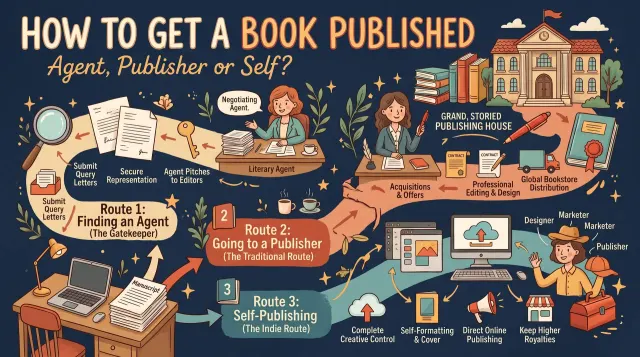
A traditional publisher pays you an advance, handles production and sells through bookshops. In return it takes most of the control and a large share of the money. Self-publishing reverses this. You hire or do the work yourself, and you keep the rest.
That freedom is real, but so is the work. Nobody will edit your book, design the cover or place it in front of readers unless you arrange it. The steps below show the full path.
The self-publishing path at a glance
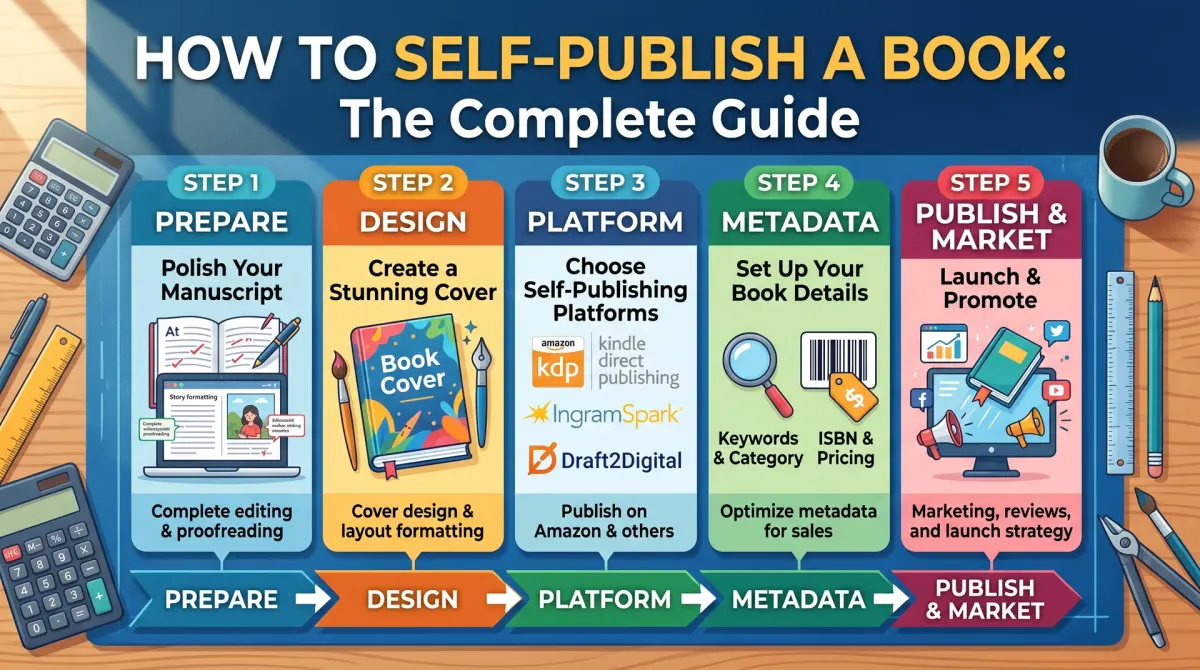
Key takeaway: There are nine steps. Writing is only the first. Most of the work that decides sales comes after the draft.
| Stage | What you do | Who can help |
|---|---|---|
| Write | Finish a complete draft | You, a writing coach |
| Edit | Fix structure, then language | Editor, beta readers |
| Format | Prepare the print and ebook files | Software or a formatter |
| Cover | Design a cover that fits your trim size | Designer or a cover tool |
| ISBN | Decide on a free or owned ISBN | Your ISBN agency |
| Platform | Pick where to sell | KDP, IngramSpark, Draft2Digital |
| Details | Write title, description, keywords | You |
| Price | Set a price that leaves a royalty | A royalty calculator |
| Launch | Publish and tell readers | You |
Write and edit the manuscript
Key takeaway: Finish a full draft before you edit. Editing a half-written book wastes time.
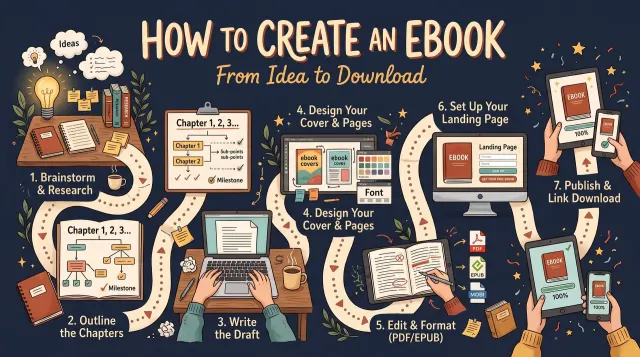
Get the whole draft down first. Then edit in two passes. The first pass fixes structure: order, gaps and weak chapters. The second fixes language: grammar, clarity and repeated words.
Outside eyes help. A paid editor is best. If the budget is tight, ask two or three beta readers who read in your genre to mark where they got bored or confused.
Format the interior
Key takeaway: A clean interior looks professional. Pick a trim size first, because the cover depends on it.
Pick your trim size, for example 6 x 9 inches, and set margins to match. Add a title page, copyright page and chapter starts. For print you upload a PDF. For ebooks you can upload a word-processor file, or use a free tool such as Kindle Create.
Use the platform's own preview before you publish. It shows how the pages and line breaks will look.
Design the cover
Key takeaway: A cover is the first thing a reader judges. It must also match your trim size and page count exactly.
For print, the cover is one wide file: back, spine and front. Its size depends on your trim size and page count. For ebooks you need only the front cover.
You can hire a designer, use a template tool, or make one yourself. Whatever you choose, check the final file against the platform's rules.
ISBN, platform and price
Key takeaway: Choose the ISBN and platform together. The free KDP ISBN limits where a print edition can be sold.
The free ISBN from KDP can be used only on KDP. If you want the same print edition sold in other places, or your own imprint name, buy your own ISBN from your national agency.
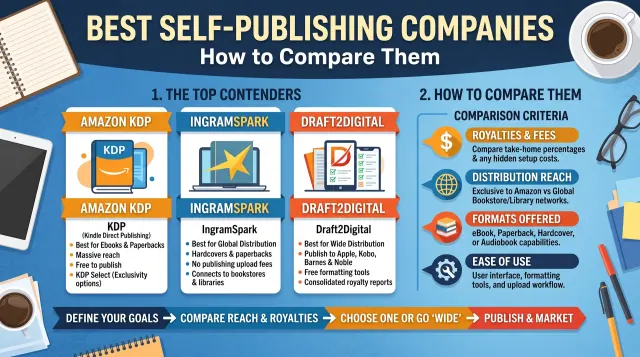
For platforms, KDP gives the largest single reader base. IngramSpark reaches bookshops and libraries. Draft2Digital and similar services place ebooks in many stores. Many authors use more than one.
Here is a worked pricing example. A 6 x 9 black-and-white paperback with 300 pages costs $4.60 to print on Amazon.com ($1.00 + 300 x $0.012). At a $14.99 list price, KDP pays 60%, or $8.99, minus $4.60. Your royalty is $4.39 per copy.
Write the book details
Key takeaway: Title, description and keywords decide whether readers find your book.
Write a clear subtitle that tells readers what the book does for them. Write a description that opens with the reader's problem. Choose keywords that match what readers type into the search box.
Pick the two or three categories that fit your book best. A smaller, well-matched category is easier to rank in than a huge one.
Publish and launch
Key takeaway: Order a proof copy first. Then publish, and plan your first month of promotion before the book goes live.
Order a printed proof. Check margins, cover colours and typos. Fix what you find, then approve and publish. KDP says new books usually go live within three business days.
Then tell readers. Ask your email list, friends and online groups for early reviews. Do this honestly. Never buy reviews or offer payment for positive ones, because platforms can remove them and close accounts.
Common mistakes to avoid
Key takeaway: Skipping editing and the proof copy causes most of the avoidable problems.
- Publishing a first draft with no outside edit.
- Choosing a cover that does not match the trim size.
- Setting a price before checking printing cost.
- Using a free ISBN and then wanting to sell elsewhere.
- Expecting sales without any marketing plan.
Self-publishing vs traditional publishing
Key takeaway: Self-publishing gives control and a higher share per sale. Traditional publishing gives an advance and bookshop reach, but you lose control.
| Point | Self-publishing | Traditional publishing |
|---|---|---|
| Who decides the cover and price | You | The publisher |
| Upfront money | You pay for services | Publisher may pay an advance |
| Share of each sale | Usually much higher | Usually a small royalty |
| Time to market | Weeks to months | Often a year or more |
| Bookshop distribution | Harder | Easier |
| Rights | You keep them | Often licensed to the publisher |
Neither route is better for every book. A niche how-to book with a clear audience often suits self-publishing. A novel aimed at bookshop shelves may suit an agent and a publisher.
What to budget for
Key takeaway: List each cost before you start. You can then decide where to spend and where to do the work yourself.
You can self-publish with very little money, but each service you skip costs time or quality. Think about these items:
- Editing. Developmental edit, copy edit and proofread are separate jobs. Get a written quote for each.
- Cover design. Prices vary a lot. Ask to see a portfolio in your genre.
- Formatting. Software can do it, or a formatter can.
- ISBN. Free from KDP for KDP only, or bought from your national agency.
- Proof copies. You pay the printing cost plus shipping.
- Marketing. Ads, review copies, a website and email tools.
Add your own quotes and see the total. Then divide the total by your royalty per copy to see how many sales you need to break even. If the royalty is $4.39 and your total spend is $1,000, you need about 228 copies (1,000 / 4.39 = 227.8, rounded up).
Ebook, paperback or hardcover?
Key takeaway: Start with an ebook and a paperback. Add a hardcover only if your readers want one.
Ebooks cost nothing to print and can be priced low. Paperbacks suit readers who like to hold a book and are the standard for bookshops. Hardcovers cost more to print, but suit gift books and collectors.
All three can be made on demand through KDP, so you can add formats later. Each print format needs its own ISBN.
Decisions that are hard to undo
Most steps in self-publishing can be redone. You can upload a new file or change a price. A few choices are harder to reverse, so make them with care.
The first is the title. Reviews, links and search results attach to it. The second is the ISBN. If you use a free KDP ISBN on a print book, that edition stays tied to KDP. The third is exclusivity. If you enrol an ebook in KDP Select, you agree not to sell that ebook elsewhere during the term.
A fourth is the trim size. A change moves the page count and the spine, so the cover must be rebuilt. Decide these four early, and write them in a notes file.
How to keep the work in order
The order of work matters more than the speed. Edit before you format. Format before you build the cover. Build the cover before you upload. A change early in the chain forces rework later.
Use one folder per book. Inside it, keep a manuscript folder, a files folder for the interior and cover, an images folder with licences, and a notes file. Date each version. When something goes wrong, you can go back to the last good file.
Set a date for each stage, and leave a gap before the launch. The gap is for the proof copy. Ordering a proof takes days, and fixing what it shows takes more.
Time, money and effort in plain terms
Self-publishing has no fixed price or schedule. A simple book with free tools can cost very little in cash and a lot in hours. A polished book with paid editing, design and ads can cost far more. The right level depends on your goals and your budget.
A useful habit is to split costs into must-have and nice-to-have. A copy edit, a proof and a readable cover are usually must-haves. Paid ads, a custom website and a launch video are nice-to-have until the book proves itself.
Track your hours as well as your money. If a task eats a whole weekend, ask whether paying a professional would be cheaper in the end.
Choosing between ebook and print first
You do not have to publish every format on day one. An ebook is quick, cheap to change and good for testing. A paperback gives readers a physical copy and helps the product page look complete.
If your book has many images, tables or workbook pages, plan the print version first. Those layouts are harder to adapt. If your book is a plain novel or memoir, the ebook is usually the easy starting point.
Whichever you start with, use the same title, subtitle and cover design across formats. A matching set builds trust.
Protecting your book and your name
Save the original files of everything you publish. Keep licences for images and fonts. Register your copyright if you want the strongest legal position, and read the official guidance for your country.
Check that your title, author name and cover do not copy another book too closely. Search the store before you commit. A clear, original title is easier to find and safer to defend.
Finally, keep a copy of your email list and your author site. Platforms change their rules. Your own list and site stay with you.
People also ask about self-publishing
Can anyone self-publish a book?
Yes. Platforms such as Amazon KDP accept books from any adult author who follows their content rules. You do not need an agent or a publisher. You do need a finished manuscript, a cover and the right files. The quality of those three things decides how your book is received.
Is self-publishing better than traditional publishing?
It depends on your goals. Self-publishing gives you speed, control and a higher share of each sale, but you pay for the work. Traditional publishing offers an advance and bookshop reach, but it is slow and selective. Many authors choose by asking which trade-off suits the book.
Do I need an editor to self-publish?
You do not have to hire one, but you should have someone else check the text. Typos and unclear chapters cost reviews. Beta readers and a proofread help most. If you can afford one paid service, a copy edit or proofread is usually the best place to start.
Where to go next
If you are still writing, start with a plan and a daily word goal. If the draft is done, move to editing and formatting. If the files are ready, read the platform guide for your first upload.
Self-publishing rewards patience and records. Keep notes, test with a proof and treat the first book as a learning project. The second book is usually easier.