What a formatter does
Key takeaway: A formatter makes the book look and work properly in print and on devices.
Book formatting services prepare your edited manuscript as print and ebook files that meet platform rules. A formatter sets the trim size, margins, fonts, chapter openings and table of contents, then delivers files you can upload to KDP or another platform.
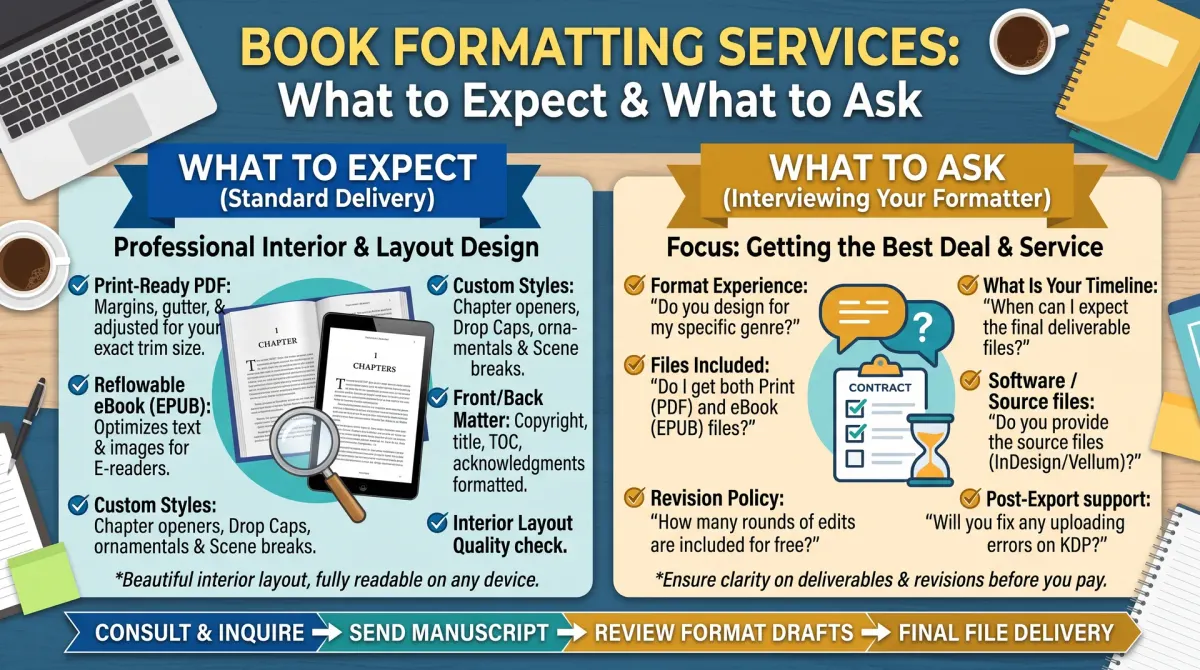
A formatter prepares the interior of your book. For print, that means setting the trim size, margins, gutter, fonts, line spacing, headers, footers, page numbers and chapter openings. For ebooks, it means building a flexible layout, a linked table of contents and clean code that works on many devices.
The formatter also arranges front matter, such as the title page and copyright page, and back matter, such as the author bio and links to other books.
What you should receive
Key takeaway: Agree the list of files in writing before you pay.
| Deliverable | What it is |
|---|---|
| Print PDF | A print-ready interior file for paperback or hardcover |
| Ebook file | An ebook file ready for upload to stores |
| Source file | The working file, so you can update it later |
| Proof | A preview or sample before final delivery |
| Revisions | An agreed number of change rounds |
Ask which platforms the files are tested for, for example KDP or IngramSpark. Check that the files pass the platform previewer.
Formatting vs editing vs design
Key takeaway: Formatting does not fix your text. Edit first.
Formatting is not editing. A formatter will not usually correct grammar or restructure chapters. Each change after formatting can cost extra and may shift pages. Finish all edits before you hand over the manuscript.
Cover design is separate too, although some services offer both. The cover depends on the final page count, so the formatter's output must be final before the cover is built.
How quotes are priced
Key takeaway: Compare what is included. A low price can hide extra fees.
Formatters price in different ways: per page, per word, per project or per format. Complex books cost more. Items that often add cost include images, tables, charts, poetry, footnotes, workbooks and multiple trim sizes.
Ask for a written quote that lists the format types, the number of revisions, the turnaround time and any extra charges. Here is a simple comparison method. Put each quote in a table with the same rows, such as print file, ebook file, source file, revisions and delivery date. Mark any row a quote leaves out. Then compare.
Questions to ask before you hire
Key takeaway: A good formatter answers clearly and shows samples.
- Can I see samples in my type of book?
- Which file types will I receive?
- Are source files included?
- How many revision rounds are included?
- How long will it take?
- What happens if the platform rejects the files?
- Who owns the final files?
- How do you handle later updates?
Keep the answers in writing, and ask for references if you are unsure.
Do it yourself or hire?
Key takeaway: Software handles simple books. Hire for complex layouts or when time matters.
A plain novel or a simple non-fiction book can be formatted with tools such as Kindle Create or a word processor. Hire help if your book has many images, tables, special characters or a complex layout, or if you want a polished look and have the budget.
Whatever you choose, test with a printed proof.
Red flags
Key takeaway: Watch for hidden fees and unclear rights.
Be careful if a service:
- will not show samples
- refuses to deliver source files
- claims rights over your book
- sells packages with unclear contents
- promises approval by every platform
How the process usually runs
Key takeaway: A clear process saves time. Know the steps and the dates before you pay.
Most formatting projects follow the same path. You send the final manuscript and your choices, such as trim size and fonts. The formatter sends a sample or a first proof. You review it and send notes. The formatter makes the changes and sends the final files.
Before you start, agree the deadline for each step. Ask how you will send files and how you will give feedback. Keep all notes in one place so nothing gets lost. Review the proof on a printed copy if you can, because small spacing problems show up better on paper.
After delivery, test the files. Upload them to the platform's previewer. Check the table of contents links in the ebook. Open the ebook on a phone, a tablet and an e-reader app if you can.
Keeping your files for the long term
Key takeaway: Ask for source files and keep a clean archive. You will need them for updates.
You may fix typos, add a new author bio or update links to your other books. If you have the source file, you can make these changes yourself or send them to any formatter. If you only have the final PDF, every change means paying again.
Store each version with a date in the file name. Keep a note of the trim size, the paper type and the page count, because you need them for the cover. Back the files up in two places.
Prepare your manuscript before you hire
A clean manuscript lowers the cost and speeds the work. Finish all edits first. Use real heading styles instead of manual bold and spacing. Remove extra spaces and tabs. Mark where images go and supply them at a good size.
Make a list of the front matter and back matter you want. Include the title page, copyright page, dedication, table of contents, author bio and links to other books.
Write down your choices: trim size, fonts you like, ebook and print needs. The more precise your brief, the fewer revisions you need.
Compare quotes in one table
Use a table with the same rows for every quote. Rows: price, print file, ebook file, source file, number of revision rounds, delivery date and extra charges. Mark any row a quote leaves blank.
A low price with fewer deliverables may cost more in the end. A higher quote with source files, revisions and tested files may be the better deal.
Ask each formatter the same questions and keep the answers in writing. Notice who answers clearly and who avoids questions.
Test the files you receive
When files arrive, test them before you pay the final balance if the contract allows. Upload the print PDF to the KDP previewer. Check margins, page numbers and chapter starts. Open the ebook on a phone, a tablet and an e-reader app.
Click every link and every table of contents entry. Check images, special characters and italics. Read the first and last pages of each chapter.
Order a printed proof. Mark every problem with a page number and send one clear list to the formatter.
Protect your files and your rights
Make sure the contract says you own the final files and the right to use them. Ask for the source file, such as the project file or the editable document. Store it in two places.
Do not let a formatter publish the book from their own account. You should own the publishing account, the ISBN and the files.
If the formatter uses fonts or images with licences, ask for a list. You may need it later if you update the book.
Plan for updates
You will probably need to change the book later. You may fix a typo, add a new book to the back matter or change a price. With the source file, you can do this or hire someone else.
Ask the formatter for a small-change price. A fixed fee for minor changes avoids surprises. Keep a log of changes with dates.
Special layouts that raise the price
Not every book is simple text. Some layouts need extra skill and time, and the quote will reflect that.
- Books with many images need careful placement and image checks.
- Cookbooks and workbooks need tables, boxes and fixed layouts.
- Poetry needs exact line breaks and spacing.
- Books with footnotes or endnotes need linked notes in the ebook.
- Books with several trim sizes need separate files.
- Fiction with special fonts or ornaments needs licence checks.
Ask the formatter to show samples of the same kind of book. A formatter who does novels well may not be the best fit for a workbook.
Also ask how the ebook and print versions will relate. A fixed-layout ebook is more complex than a reflowable one, and not all stores treat them the same.
Timing, deadlines and communication
Agree on a timeline before you pay. Ask when work starts, how long the first draft takes and how long each revision round takes. Ask what happens if you are late with feedback.
Send all materials at once. Late changes to text are the biggest cause of delay and extra cost. If you must change something, send a list of all changes together.
Keep communication in one place, such as one email thread. Name your files clearly. Write down decisions so no one has to guess later.
If the formatter misses a deadline, ask for a new date in writing. A pattern of delays is a reason to review the contract.
People also ask about book formatting services
How much do book formatting services charge?
Prices vary by length, complexity and the formatter. Quotes may be per page, per word or a flat fee. Images, tables and several formats raise the cost. Ask for written quotes with the same line items so you can compare what is included, not only the total.
Can I format my own book for KDP?
Yes. Many authors use free or paid software and check the result in the KDP previewer. A simple text book is easy to format. Complex layouts take more time. Order a printed proof, because small problems often show up on paper rather than on screen.
What file formats will a formatter give me?
Usually a print-ready PDF and an ebook file, and often the source file too. Ask which platforms the files are tested for. Agree the list in writing before you pay. Also ask whether later changes cost extra and how long the formatter keeps your files.
Make a clear decision
Choose the service that is clear about what you receive, how many revisions you get and who owns the files. Cheap and vague costs more than fair and clear.