What is a manuscript?
Key takeaway: A manuscript is the author's full text before it becomes a published book.
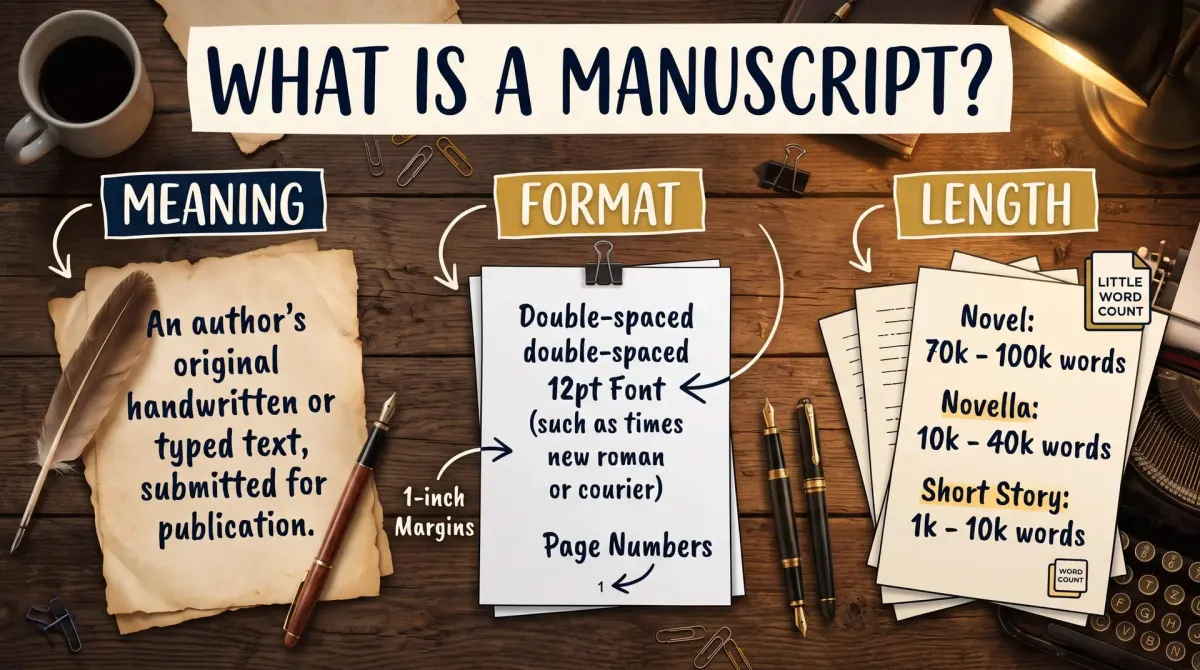
What is a manuscript is a common question for new authors. A manuscript is the complete text of a book as the author prepares it, before publication. It may be typed or handwritten. Authors submit it to agents and editors or convert it into a book file for printing.
The word comes from Latin terms meaning "written by hand". Today the manuscript meaning covers any author's text. It is usually typed in a word processor.
Here is the manuscript definition in a publishing setting. It is the author's version of the book, not the final product. It may still change after editing, proofreading and design.
A manuscript can be:
- A complete first draft, rough but finished.
- A revised draft after edits.
- A polished version ready for submission.
- A clean file ready for formatting.
It is not the same as a book. A book has a cover, a layout, front matter and a printed or digital form. The manuscript is the text inside.
The word still carries a sense of "not final." Even a polished manuscript is waiting for the next step. That step depends on your path.
From draft to book: the stages
Key takeaway: The same text moves through stages, and each stage has a different file.
Here is a stage map for a self-publishing author.
| Stage | What it is | File |
|---|---|---|
| First draft | Rough full text | Word or Google Docs |
| Revised manuscript | Edited for story | Word |
| Final manuscript | Proofread and clean | Word |
| Book file | Formatted for print or ebook | PDF, EPUB or DOCX |
A draft is any early version of your text. A manuscript is usually the complete, intended text. A proof is a near-final version, used to check for last errors. A book file is the formatted version that readers see.
Amazon KDP is Amazon's self-publishing service for ebooks and paperbacks. Its help page says KDP accepts EPUB, DOC/DOCX and KPF files for reflowable ebooks. So a clean Word manuscript can be uploaded as a DOCX if it is formatted well.
That is why formatting matters. A manuscript for an agent is plain. A manuscript for KDP needs headings, a linked table of contents and a clean structure.
For the full path from idea to published book, read the self-publishing guide.
Standard manuscript format: what agents often ask for
Key takeaway: Always follow the posted rules of the agent or publisher. These settings are common, not universal.
If you plan to submit to agents or publishers, ask what format they want. There is no single standard. Each agent posts guidelines. Follow them exactly.
Many submissions ask for a plain, readable file. Common settings include:
- A standard readable font, such as Times New Roman at 12 points.
- Double line spacing.
- One-inch margins on all sides.
- Page numbers and the title in a header.
- A new chapter starting on a new page.
These are widely used conventions, not rules. The format keeps the text easy to read and easy to mark up.
The phrase standard manuscript format refers to this type of plain layout. It is built for editing, not for readers. That is why it looks plain and uses extra space.
When you wonder how to format a manuscript for submission, the first step is to read the agent's guidelines. If they ask for a different font or file type, do that.
Keep a clean master file. Use heading styles for chapter titles and avoid manual spaces and tabs. This will save you hours later, whichever route you take.
Manuscript format for self-publishing
Key takeaway: A self-publishing manuscript is built for conversion, so structure matters more than looks.
If you publish yourself, your manuscript becomes the source for the book file. Structure matters more than look.
Follow these habits.
- Use Heading 1 for each chapter title.
- Use one body style for all paragraphs.
- Set indents with styles, not tabs.
- Add page breaks before each chapter.
- Build the table of contents from headings.
- Remove extra blank lines.
KDP's table of contents help page gives specific steps for Word. It says to apply Heading 1 to chapter titles and insert the contents from the References tab. Then clear the option to show page numbers and set the levels to 1. Add a bookmark named "toc" at the contents page.
A clean structure also helps with formatting software and with professionals. Formatters can convert a clean file faster and at lower cost.
Do not format your manuscript to look like the printed book inside Word. Page size, margins and fonts for print are set in the book file, not in the manuscript.
Manuscript length: words and pages
Key takeaway: Count words first. Pages follow from the formatting you choose.
Length is usually measured in words. Word count is stable. Page count changes with font, spacing and trim size.
Here is a worked example for a manuscript of 80,000 words.
- Double spaced at 250 words per page: 80,000 ÷ 250 = 320 pages.
- Single spaced at 500 words per page: 80,000 ÷ 500 = 160 pages.
- Printed book at 300 words per page: 80,000 ÷ 300 = 266.7, so about 267 pages after rounding up.
The three results are very different. That is why agents ask for word counts, not page counts.
The 250, 500 and 300 words per page figures are rules of thumb. Your real numbers depend on your own settings.
How long should your manuscript be? It depends on genre. Novels often fall in a range, but ranges vary by genre and by publisher. For genre ranges, read the length guide on this site.
A manuscript also needs a safe home. Keep one master file and work on copies. Name each copy with the date. If a change goes wrong, you can return to an earlier version and try again.
How to prepare a manuscript: steps
Key takeaway: Finish the story, revise, proofread and then format for your next step.
Follow these steps from draft to ready file.
- Finish the first draft.
- Let it rest for a few days.
- Revise for story and structure.
- Edit for clarity and style.
- Proofread for errors.
- Apply heading styles.
- Save a clean master copy.
Step two is simple and powerful. A short rest gives you fresh eyes. You will notice weak scenes and slow openings.
Step five can be done by a professional. A proofreader catches typos that you will miss.
Step seven is a safety step. Save a master file in a folder with a clear name and date. Keep a backup in a second place.
If you wonder how long this takes, use a time formula. The guide on this site shows how to estimate it.
People Also Ask
What is the difference between a manuscript and a book?
A manuscript is the author's full text before publication. A book is the finished product with a cover, a layout, front matter and a print or digital form. The manuscript is the source. Editing, proofreading and design turn it into the book readers buy.
What is the difference between a draft and a manuscript?
A draft is any early version of your text. A manuscript is the complete, intended text of the book. A finished first draft can count as a manuscript. Many writers use the word for a revised, polished version ready for submission.
What file type should I use for a manuscript?
Use a Word document unless an agent or publisher asks for something else. A DOCX file works for most submissions. KDP also accepts DOC/DOCX, EPUB and KPF files for reflowable ebooks. Always check the posted guidelines before you send a file.
Common mistakes
Key takeaway: Most manuscript problems come from poor structure and mixed formats.
- Using tabs and spaces for indents.
- Sending the wrong format to an agent.
- Formatting the manuscript like a printed book.
- Skipping a proofread.
- Losing track of the latest version.
Your next step: save a clean master file
Open your manuscript. Apply Heading 1 to every chapter title. Save a master copy with the date in the file name. Then choose your next step: submission or publishing.
If you publish yourself, move to formatting and run a final check.